
Playback Time
dash.js exposes multiple API endpoints in the MediaPlayer class to query the current playback position and information about the DVR window. Examples for VoD and live playback are illustrated in the sections below.
All methods available via the player instance, as an example:
var video = document.querySelector('video');
var player = dashjs.MediaPlayer().create();
player.initialize(video, url, false);
var time = player.time();
VoD
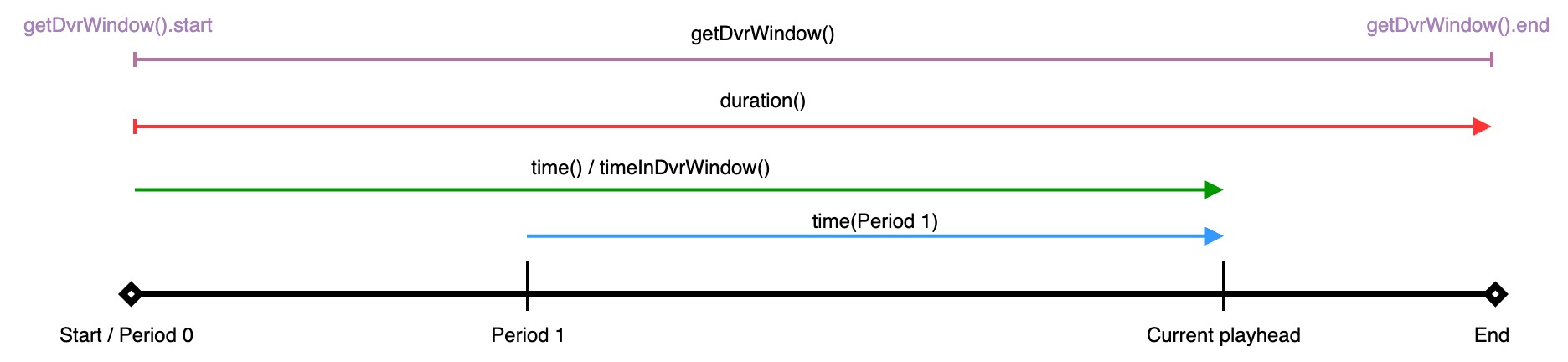
| API call | Description |
|---|---|
time() | Returns the current playback time relative to playback start (usually 0). |
time(periodId) | Returns the current playback time relative to the period specified in periodId. |
duration() | Returns the total duration of the content. |
getDvrWindow() | Returns the start, the end and the size of the DVR window. For VoD content all media segments are available. Consequently, the DVR windows spans over the whole duration of the content. |
Live
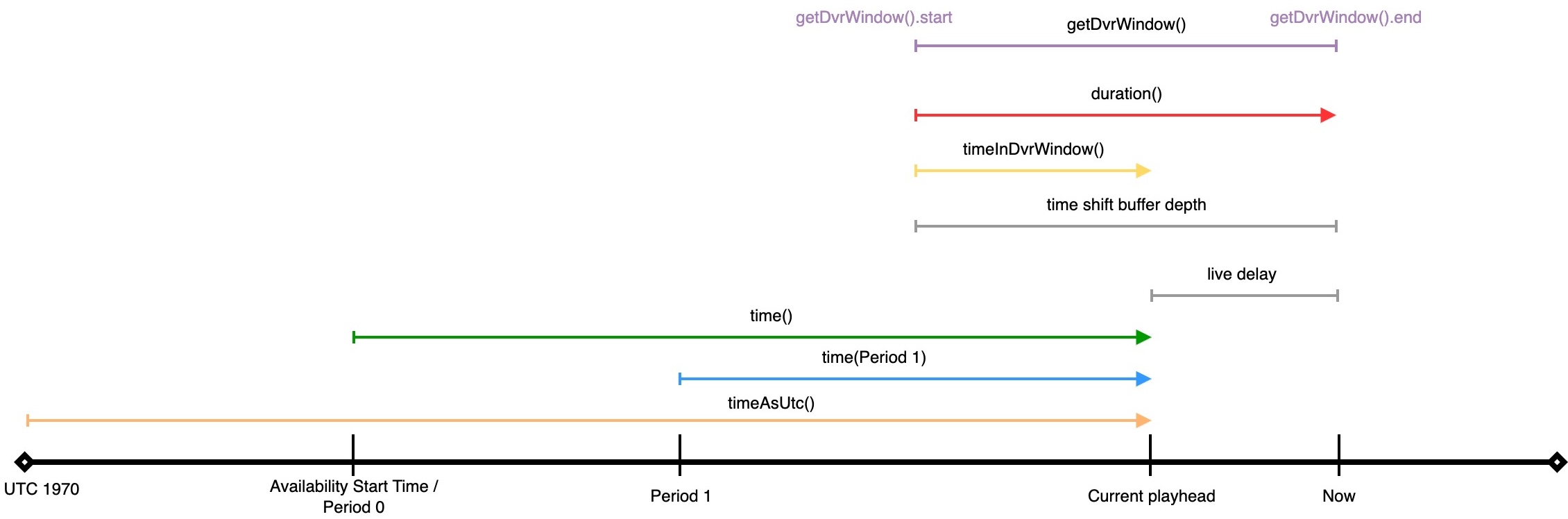
| API call | Description |
|---|---|
time() | Returns the current playback time relative to playback start (availability start time). |
time(periodId) | Returns the current playback time relative to the period specified in periodId. |
timeAsUtc() | Returns the current playback time relative to midnight UTC, Jan 1 1970 |
timeInDvrWindow() | Returns the current playback time relative to the start of the DVR window. |
duration() | Returns the size of the DVR window: DVRWindow.end - DVRWindow.start. |
getDvrWindow() | Returns the start, startAsUtc, the end, endAsUtc and the size of the DVR window. For live content media segments become available over time. |
Seeking
dash.js provides two API endpoints to change the current playback position, namely seek() and seekToPresentationTime(). Both methods are available via the MediaPlayer class. As an example:
var video = document.querySelector('video');
var player = dashjs.MediaPlayer().create();
player.initialize(video, url, false);
player.seek(10)
While the seek() method expects values relative to DVRWindow.start the seekToPresentationTime() works with absolute presentation timestamps. Two examples to illustrate this behavior are depicted in the sections below.
VoD
For VoD playback both seek() and seekToPresentationTime() work in the same way and can be used interchangeable. This is due to the fact the DVR window for VoD spans over the whole duration of the content.

Live
For live playback the seek() method expects values relative to the start of the DVR window. Internally DVRWindow.start is added to the provided value. The seekToPresentationTime() method uses absolute presentation timestamps.

As an example, the following two code snippets each trigger a seek 20 seconds behind the live edge.
seek()
var video = document.querySelector('video');
var player = dashjs.MediaPlayer().create();
player.initialize(video, url, false);
var duration = player.duration()
player.seek(duration - 20);
seekToPresentationTime()
var video = document.querySelector('video');
var player = dashjs.MediaPlayer().create();
player.initialize(video, url, false);
var dvrWindowEnd = player.getDvrWindow().end
player.seekToPresentationTime(dvrWindowEnd - 20);
Setting a start time
By default, playback starts at the beginning of a VoD presentation and at the live edge (minus the live delay) for live presentations. To start at a different position, pass a start time as the second parameter of attachSource():
player.initialize();
player.attachView(video);
player.attachSource(url, starttime);
The interpretation of starttime depends on the type of content:
- VoD: the start time is relative to the start of the first period, in seconds.
- Live:
- With the
posix:prefix the value signifies an absolute time in seconds of Coordinated Universal Time (number of seconds since 01-01-1970 00:00:00 UTC). Fractions of seconds may be specified down to the millisecond level:player.attachSource(url, 'posix:1696243200'). - Without the
posix:prefix the start time is relative toMPD@availabilityStartTime.
- With the
For example, to start playback 60 seconds behind the current wall clock time:
const starttime = new Date().getTime() / 1000 - 60;
player.attachSource(url, `posix:${starttime}`);
An example is available in the start time sample.
MPD anchors
Alternatively, the start time can be signaled directly in the MPD URL using an MPD anchor as defined in Annex C.4 of the DASH specification. dash.js parses the anchor and starts playback at the requested position:
// start playback at second 60
const url = 'https://dash.akamaized.net/akamai/bbb_30fps/bbb_30fps.mpd#t=60';
player.initialize(video, url, true);
For live streams, #t=posix:... is supported analogously to the attachSource() syntax described above.
An example is available in the MPD anchor sample.