
1. Intellectual Property Rights
1.1. Disclaimer
This is a document made available by DASH-IF. The technology embodied in this document may involve the use of intellectual property rights, including patents and patent applications owned or controlled by any of the authors or developers of this document. No patent license, either implied or express, is granted to you by this document. DASH-IF has made no search or investigation for such rights, and DASH-IF disclaims any duty to do so. The rights and obligations which apply to DASH-IF documents, as such rights and obligations are set forth and defined in the DASH-IF Bylaws and IPR Policy, including but not limited to patent and other intellectual property license rights and obligations. A copy of the DASH-IF Bylaws and IPR Policy can be obtained at https://dashif.org/.
The material contained herein is provided on an "AS IS" basis and, to the maximum extent permitted by applicable law, this material is provided AS IS, and the authors and developers of this material and DASH-IF hereby disclaim all other warranties and conditions, either express, implied, or statutory, including but not limited to any (if any) implied warranties, duties, or conditions of merchantability, of fitness for a particular purpose, of accuracy or completeness of responses, of workmanlike effort, and of lack of negligence.
In addition, this document may include references to documents and/or technologies controlled by third parties. Those third-party documents and technologies may be subject to third-party rules and licensing terms. No intellectual property license, either implied or express, to any third-party material is granted to you by this document or DASH-IF. DASH-IF makes no warranty whatsoever for such third-party material.
Note: IPR declarations relevant to DASH-IF specifications are published at https://dashif.org/ipr-declarations/.
1.2. Modal Verbs Terminology
In the present document, shall, shall not, should, should not, may, need not, will, will not, can, and cannot are to be interpreted as described in the ETSI Drafting Rules (Verbal forms for the expression of provisions). must and must not are NOT allowed in DASH-IF deliverables except when used in direct citation.
2. Scope
This document specifies interoperability points for live and low-latency live DASH services as part of DASH-IF IOP v5 Part 4.
Note: This is a working-draft skeleton created in the IOPv5 authoring workspace.
Prose is migrated and reconciled from the sources tracked in
rag/sources.yaml (the Part 4 draft, Low-Latency CR r8/r9, and the relevant
MPEG DASH / CMAF baselines).
3. Normative References
Normative and informative references are managed via SpecRef and, where needed,
the repository-local biblio.json. Reference MPEG DASH normatively as
[MPEGDASH] and CMAF as [MPEGCMAF] once the corresponding SpecRef or local
bibliography entries are confirmed.
4. Definitions
- Addressable Resync Representation (ARR)
-
A forward-looking concept for a Representation that enables fast tune-in and switching via addressable resynchronisation points. Not yet a normative construct in MPEG-DASH or in Low-Latency CR r8/r9, which specify resynchronisation via the Resync element; retained here as a placeholder pending MPEG-DASH (see
rag/reports/reconcile-low-latency-r8-r9.md). - Segment Sequence
-
A sequence of segments as defined in the MPEG DASH baseline; usage in the live/low-latency context is to be reconciled with CR r8/r9 text.
5. Live Services
The Live Services requirements and recommendations are specified in the included clauses that follow.
6. Change History
| Version | Date | Change |
|---|---|---|
| 0.1 | Initial | Skeleton created in IOPv5 authoring workspace. |
| 0.2 | Initial | Migrated Low-Latency Live Services clause (§6) from the agreed Part 4 draft. |
| 0.3 | Initial | Migrated Live Services clause from v4.3, aligned to the current MPEG-DASH (ISO/IEC 23009-1) edition. |
7. Live Services
7.1. Introduction
Note: This clause is migrated from DASH-IF IOP v4.3 (Live Services) and aligned to the current edition of MPEG-DASH [MPEGDASH]. References to specific past editions of ISO/IEC 23009-1 have been removed in favour of the current edition.
MPEG-DASH [MPEGDASH] provides several tools to support live services. This clause provides requirements and recommendations for both content authoring and client implementations. It clarifies and refines the interoperability details of dynamic (live) service configurations and client behaviour, based on the features of the current edition of ISO/IEC 23009-1.
Note: Earlier versions of this document distinguished a "simple live" and a "main live" interoperability point tied to the 2012 and 2014 editions of MPEG-DASH. That distinction is no longer maintained: the current edition of ISO/IEC 23009-1 provides a unified set of live tools, and this clause is written against that baseline. Low-latency operation is specified separately in § 8 Low-Latency Live Services.
Note: DVB-DASH [DVBDASH] defines a Live profile that constrains a subset of the live mechanisms described in this clause: it requires explicit or simple SegmentTemplate addressing (excluding Period.SegmentList and multiplexed Representations), a minimum Segment duration of 960 ms (except the final Segment of a Period), and a bounded MPD size and structure (see Part 2, "MPD Size and Structural Limits"). Alignment notes relevant to specific live mechanisms are provided in the clauses below.
7.2. Overview: Dynamic and Live Media Presentations
A DASH Media Presentation with MPD@type set to dynamic allows media to be
made available over time, and its availability may also be removed over time.
This has two major effects:
-
The content author can announce a DASH Media Presentation for which not all content is yet available, but only becomes available over time.
-
Clients follow a timed playout schedule as intended by the content author.
Dynamic services may be used for different types of service:
- Dynamic Distribution of Available Content
-
Content that is made available as dynamic content but is entirely generated prior to distribution. The details of the Media Presentation — in particular the Segments (duration, URLs) — are known and can be announced in a single MPD without MPD updates.
- MPD-controlled Live Service
-
A live service for which the client polls and reloads the MPD following
MPD@minimumUpdatePeriodto discover newly available Segments and Periods. - MPD- and Segment-controlled Live Service
-
A live service for which the client is additionally informed of MPD changes by inband information carried in the Segments (for example, MPD validity expiry events), reducing reliance on periodic MPD polling.
7.3. Dynamic Segment Download
7.3.1. Background and Assumptions
The dynamic segment download function is a key component of live services and may also be used for scheduling a playout. In this clause it is assumed, unless stated otherwise, that the client has access to a single instance of an MPD and that all information about the entire Media Presentation is contained in that MPD; MPD updates are addressed in § 7.4 Live Service Offering including MPD Updates.
We refer to such a service as a dynamic service: its defining feature is that Segments are made available over time following the schedule of the media timeline. Dynamic services are documented primarily to explain the timing model of Segment availability, which forms the basis for live services.
7.3.2. Period Timing
For a live service (dynamic presentation):
-
The first Period shall start at or after the zero point of the MPD timeline (with a
Period@startvalue of 0 seconds or greater). -
The last Period may have a
Period@duration, in which case it has a fixed duration. If withoutPeriod@duration, the last Period in a dynamic presentation has an unlimited duration that may later be shortened by an MPD update.
Note: A Period with an unlimited duration can be converted to fixed duration by an MPD update, so even a nominally unlimited duration is effectively constrained by the MPD validity duration of the current MPD snapshot.
These constraints enable live services to start at any point on the MPD timeline and support both fixed-duration and open-ended Periods for ongoing live content.
See Part 2 for general period timing rules that apply to all DASH-IF Media Presentations. See the DASH-IF Guidelines-TimingModel document [DASHIF-TIMING] for detailed discussion of the DASH timing model.
7.3.3. Segment Availability Timing Model
Segment availability is governed by the timing model of ISO/IEC 23009-1. For a
Media Presentation accessible at time NOW at its location:
-
All Segments for all Representations in all Periods announced in an MPD shall be available no later than their announced Segment Availability Start Time (SAST) at their derived URLs.
-
All such Segments shall remain available at least until their announced Segment Availability End Time (SAET) at their derived URLs.
-
For all Media Segments, the Segment in a Period is available no later than the sum of the Period start (in wall-clock time), the earliest presentation time, and the segment duration.
Note: The derivation of SAST, SAET, and Segment URLs follows the addressing and
timing rules of ISO/IEC 23009-1 (SegmentTemplate, SegmentTimeline,
@availabilityStartTime, @availabilityTimeOffset, @presentationTimeOffset).
7.3.4. Segment Information Derivation
Based on an MPD available at time NOW on the server, a synchronized DASH client
derives the list of Segments for each Representation in each Period. The following
definitions, aligned with ISO/IEC 23009-1, apply:
- available Segment
-
A Segment that is accessible at its assigned HTTP-URL: an HTTP GET to the URL returns the Segment with a 2xx status code.
- valid Segment URL
-
An HTTP-URL that is promised to reference a Segment during its Segment availability period.
- NOW
-
The wall-clock time on the content server. All wall-clock-related information in the MPD is expressed relative to
NOW.
MPD information. For a dynamic service without MPD updates: MPD@type shall
be dynamic; MPD@mediaPresentationDuration shall be present, or the
Period@duration of the last Period shall be present; MPD@minimumUpdatePeriod
shall not be present. It is recommended to provide MPD@timeShiftBufferDepth and
MPD@suggestedPresentationDelay.
Period information. Each Period i is assigned a Period start time in wall-clock time (PSwc[i]) and a Period end time in wall-clock time (PEwc[i]), determined per ISO/IEC 23009-1:
-
If
Period@startis present, PSwc[i] is the sum ofMPD@availabilityStartTime(AST) and@start. -
Otherwise, if the previous Period has
@duration, PSwc[i] is the previous Period start plus that duration (@start, if also present, takes precedence). -
The Period end time PEwc[i] is the start of the next Period (PSwc[i+1]); for the last Period it derives from
MPD@mediaPresentationDurationor the lastPeriod@duration, and an MPD update may extend it.
Representation information. For a Period i, when SegmentTemplate.SegmentTimeline
is present (and SegmentTemplate@duration is not), the SegmentTimeline contains
S elements with @t (start time), @d (duration), and @r (repeat count),
from which the number and timing of Segments — and hence SAST/SAET and URLs — are
derived using @timescale and any applicable @availabilityTimeOffset. A
negative @r repeats until the next @t or the Period end. Gaps are possible and
indicate that no media is present for the gap.
Media time information. Each Media Segment k has an earliest presentation time (EPT[k,r,i]) and an accurate duration, measured in media presentation time. EPT may be estimated from the MPD (SAST minus announced segment duration) or determined accurately from the Segment itself.
7.3.5. Service Offering Requirements and Guidelines
For dynamic service offerings, the MPD shall conform to DASH-IF IOP and shall at least contain the mandatory information required by ISO/IEC 23009-1 for a dynamic Media Presentation:
-
MPD@typeshall be set todynamic. -
MPD@availabilityStartTimeshall be present and provides the wall-clock anchor for the Media Presentation timeline. -
MPD@publishTimeshall be present and shall be updated whenever the MPD content changes, so that clients can detect a changed MPD. -
Where the presentation end time is not known in advance,
MPD@minimumUpdatePeriodshall be present; the Period end time of the last Period is then obtained as the sum ofNOWandMPD@minimumUpdatePeriod.
Content may be offered as a single Period or as multiple Periods (for example for
ad insertion opportunities, program changes, or operational purposes). Segment
information may be provided using SegmentTemplate with @duration, or using
SegmentTemplate with SegmentTimeline.
7.3.6. Availability Window
A Media Segment is available when an HTTP request to acquire the Media Segment can be started and successfully performed to completion by a client [MPEGDASH]. During playback of a dynamic presentation, new Media Segments continuously become available and stop being available with the passage of time.
An availability window is a time span on the MPD timeline that determines which Media Segments clients can expect to be available. Each Adaptation Set has its own availability window. Services shall not define MPD attributes that affect the availability window on the Representation level.
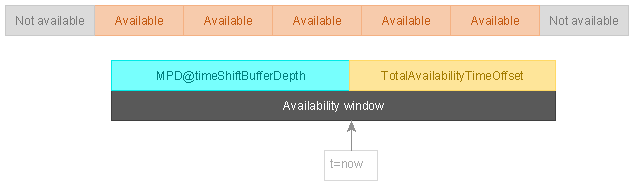
Note: A DASH service will typically make Media Segments available some seconds ahead of the current time, depending on its configuration and latency target. Furthermore, some Periods may be entirely prepared in advance and available at all times (e.g., ads inserted between truly live content).
The availability window is calculated as follows:
-
Let
nowbe the current wall clock time according to the synchronized clock. -
Let
AvailabilityWindowStartbenow - MPD@timeShiftBufferDepth.-
If
MPD@timeShiftBufferDepthis not defined, letAvailabilityWindowStartbe the effective availability start time.
-
-
Let
TotalAvailabilityTimeOffsetbe the sum of all@availabilityTimeOffsetvalues that apply to the Adaptation Set, either via SegmentBase, SegmentTemplate, or BaseURL elements [MPEGDASH]. -
The availability window is the time span from
AvailabilityWindowStarttonow + TotalAvailabilityTimeOffset.
Media Segments that have their segment end point inside or at the end of the availability window are available [MPEGDASH].
Clients may at any point attempt to acquire any Media Segments that the MPD signals as available. Clients shall not attempt to acquire Media Segments that the MPD does not signal as available.
Despite best efforts, DASH services occasionally fail to achieve the availability windows advertised in the MPD. To ensure robust behavior, clients should not assume that Media Segments described by the MPD as available are available and should implement appropriate retry/fallback behavior.
7.3.7. Time Shift Buffer
The time shift buffer is a time span on the MPD timeline that defines
the set of Media Segments that a client is allowed to present at the current moment
in time according to the wall clock (now).
This is the mechanism by which clients can introduce a time shift (an offset) between wall clock time and the MPD timeline when presenting dynamic presentations. The time shift is zero when a client is presenting the Media Segment at the end point of the time shift buffer.
The following additional factors further constrain the set of Media Segments that can be presented at the current time:
-
§ 7.3.6 Availability Window - not every Media Segment in the time shift buffer is guaranteed to be available.
-
§ 7.3.8 Presentation Delay - the service may define a delay that forbids the use of a section of the time shift buffer.
The time shift buffer extends from now - MPD@timeShiftBufferDepth to now. In
the absence of MPD@timeShiftBufferDepth, the start of the time shift buffer is
the effective availability start time.
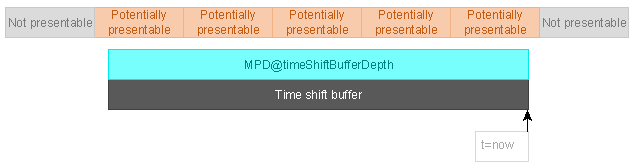
Clients may present samples from Media Segments that overlap the time shift buffer, assuming no other constraints forbid it. Clients shall not present samples from Media Segments that are entirely outside the time shift buffer.
A dynamic presentation shall contain a Period that ends at or overlaps the end point of the time shift buffer, except when reaching the end of live content.
Clients shall not allow seeking into regions of the time shift buffer that are not covered by Periods.
Note: DVB-DASH [DVBDASH] requires DVB-DASH Live players to support a minimum
time shift buffer depth of 4 hours where offered by the service, and defines
its own recommended default @timeShiftBufferDepth values per service type.
Services intending to remain usable by DVB-DASH Live players should confirm
that @timeShiftBufferDepth is set consistently with the DVB-DASH Content
Provider Guidelines rather than relying on IOP v5 defaults alone.
7.3.8. Presentation Delay
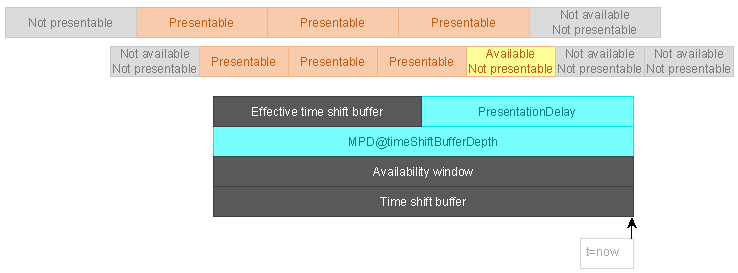
There is a natural conflict between the availability window and the time shift buffer. It is legal for a client to present Media Segments as soon as they overlap the time shift buffer, yet such Media Segments might not yet be available.
The mechanism that allows DASH clients to resolve this conflict is the presentation delay, which decreases the time shift buffer by moving its end point into the past, creating an effective time shift buffer with a reduced duration.
Clients shall calculate a suitable presentation delay to ensure that the Media Segments it schedules for playback are available and that there is sufficient time to download them once they become available.
Note: Calculating an optimal presentation delay requires knowledge of Segment durations, availability timing, network conditions, and buffer requirements.
The information required to calculate an optimal presentation delay might not always
be available to DASH clients. Services may define the
MPD@suggestedPresentationDelay attribute to provide a suggested presentation
delay. Clients should use MPD@suggestedPresentationDelay when provided by the MPD.
7.4. Live Service Offering including MPD Updates
7.4.1. Preliminaries
To offer a live service with an unknown presentation end time using a single evolving MPD, the service provider publishes an initial MPD prior to the presentation start so that clients may access it in advance. The MPD is assigned a publish time, and clients reload the MPD over time to discover newly available Segments and Periods.
7.4.2. Service Offering Requirements and Guidelines
For a live service offering that relies on MPD updates:
-
The same general dynamic service requirements in § 7.3.5 Service Offering Requirements and Guidelines apply at any time
NOWthat the MPD is present on the server. -
MPD@minimumUpdatePeriodshall be set to a value consistent with the rate at which the timeline is extended and with any change lead time the service guarantees. -
On each change, the service shall write a new MPD with an updated
MPD@publishTime; clients detect the change by comparing publish times. -
MPD@minimumUpdatePeriodmay be set to0to indicate that the client should revalidate the MPD before requesting each Segment when the timeline is not predictable.
Note: MPD updates are the baseline mechanism for live. Additional, lower-latency signalling of MPD changes is provided by the segment-based mechanism in § 7.5 MPD- and Segment-based Live Service Offering.
7.4.3. MPD Snapshot Validity
The MPD of a dynamic presentation remains valid not only at its moment of initial
publishing but through the entire MPD validity duration, which is a
time span of duration MPD@minimumUpdatePeriod starting from the moment the MPD
download is started by a client [MPEGDASH].
Clients shall process state changes that occur during the MPD validity duration. For example, new Media Segments will become available over time if they are referenced by the MPD and old ones become unavailable, even without downloading a new snapshot of the MPD.
The presence or absence of MPD@minimumUpdatePeriod shall be used by DASH services
to signal whether and when the MPD might be updated:
-
A nonzero value for
MPD@minimumUpdatePerioddefines the MPD validity duration of the present snapshot of the MPD, starting from the moment its download was initiated. This allows the service to provide regular updates to the MPD while limiting the refresh interval to avoid overload. -
The value 0 for
MPD@minimumUpdatePeriodindicates that the MPD has no validity after the moment it is retrieved. In such a situation, the client shall acquire a new MPD whenever it wants to make new Media Segments available. -
Absence of the
MPD@minimumUpdatePeriodattribute indicates an infinite validity (the MPD will never be updated).
7.4.4. Adding Content to the MPD
[MPEGDASH] allows the following mechanisms for adding content to a dynamic presentation:
-
Additional Segment references may be added to the last Period.
-
Additional Periods may be added to the end of the MPD.
Segment references shall not be added to any Period other than the last Period.

A live service will typically use a Period with an unlimited duration to continuously add new Segment references. An MPD update that adds content may be combined with an MPD update that removes content.
7.4.5. Removing Content from the MPD
[MPEGDASH] allows the following mechanisms for removing content from a dynamic presentation:
-
The last Period may change from unlimited duration to fixed duration.
-
The duration of the last Period may be shortened.
-
One or more Periods may be removed entirely from the end of the MPD timeline.
-
Expired Periods and Segment references that no longer overlap the time shift buffer may be removed from the start of the MPD timeline.
Removal of content is only allowed if the content to be removed is expired or not yet available to clients and guaranteed not to become available within the MPD validity duration of any MPD snapshot potentially downloaded by clients.
To determine the content that may be removed, calculate EarliestRemovalPoint as
follows for each Adaptation Set:
-
Let
PublishingDelaybe the end-to-end delay for MPD update publishing (the time between the MPD generator creating a new version and it becoming published to all clients on the CDN edge). -
Let
AvailabilityWindowEndbe the end point of the availability window. -
Let
EarliestRemovalPointbeAvailabilityWindowEnd + MPD@minimumUpdatePeriod + PublishingDelay.
An MPD update removing content shall not remove any Segment references to Media
Segments with a segment start point before or at EarliestRemovalPoint.

Explicitly defined Segment references (S elements) shall be removed when they
have expired (i.e. the segment end point has fallen out of the time shift buffer).
Periods with their end points before the time shift buffer shall be removed.
7.4.6. End of Live Content
Live services can reach a point where no more content will be produced. When an MPD is updated to a state that describes the final content of a live service, the service shall:
-
Define a fixed duration for the last Period.
-
Remove the
MPD@minimumUpdatePeriodattribute. -
Cease performing MPD updates.
This signals to clients that no more content will be added to the MPD.
Upon detecting the removal of MPD@minimumUpdatePeriod, clients should present a
user experience suitable for end of live content.
Note: A common mistake is to treat the eventual cessation of new content as a transient or fatal error, resulting in potentially infinite loading even before the final Media Segment is presented to the user.
If the ending live service is to be converted to a static presentation for
on-demand viewing, the service may change MPD@type to static when
MPD@minimumUpdatePeriod is removed or do so at a later time. Clients shall not
lose track of the playback position if a dynamic presentation becomes a static
presentation.
7.4.7. MPD Refreshes
To stay informed of MPD updates, clients need to perform MPD refreshes at appropriate moments to download updated MPD snapshots.
Clients presenting dynamic presentations shall execute the following MPD refresh logic:
-
When an MPD snapshot is downloaded, it is valid for the MPD validity duration as measured from the moment the download is initiated.
-
A client can expect to be able to successfully download any Media Segments that the MPD defines as available at any point during the MPD validity duration.
-
The client may refresh the MPD at any point to obtain more Segment references or extend the MPD validity duration.
Note: There is no requirement that clients poll for updates at
MPD@minimumUpdatePeriod interval. They can do so as often or as rarely as they
wish — this attribute simply defines the MPD validity duration.
Clients using HTTP to perform MPD refreshes should use conditional GET requests as specified in [RFC7232] to avoid unnecessary data transfers when the contents of the MPD do not change between refreshes.
7.5. MPD- and Segment-based Live Service Offering
7.5.1. Preliminaries
In addition to periodic MPD polling, ISO/IEC 23009-1 allows the client to be informed of MPD changes by inband information carried in the Segments. This reduces the need for frequent MPD requests and allows the timeline to be extended and terminated with lower signalling latency.
7.5.2. Service Offering Requirements and Guidelines
For a service offering that relies on segment-based MPD update signalling:
-
The service shall carry inband events indicating MPD validity expiry (the
urn:mpeg:dash:event:2012scheme, or the applicable scheme of the current edition) so that clients learn when the current MPD is no longer valid. -
The InbandEventStream element shall be signalled for the Adaptation Sets or Representations that carry these events.
-
When segment-based updates are used, the client may extend the timeline based on Segment information without reloading the MPD until an MPD validity expiry event indicates that a new MPD is required.
Note: DVB-DASH [DVBDASH] mandates support for the urn:mpeg:dash:event:2012
MPD validity expiry event and requires that DVB-DASH Live players react to it
by fetching an updated MPD. DVB-DASH also restricts the set of changes a
segment-based or MPD-based update may make (see Part 2, "MPD Updates" for the
enumerated list); services should confirm their update pattern falls within
that list when DVB-DASH compatibility is required.
7.6. Availability Time Synchronization between Client and Server
7.6.1. Background
According to ISO/IEC 23009-1, in order to correctly access MPDs and Segments that become available over time, DASH servers and clients should synchronize their clocks to a globally accurate time standard. Segment availability times are announced in wall-clock time in the MPD, and the client needs access to the same time base as the MPD generation in order to request Segments at the right time.
7.6.2. Service Provider Requirements and Guidelines
If the Media Presentation is dynamic, or if MPD@availabilityStartTime is
present, the service shall provide a Media Presentation as follows:
-
The Segment availability times announced in the MPD should be generated from a device synchronized to a globally accurate timing source, preferably using NTP.
-
The MPD should contain at least one UTCTiming element with
@schemeIdUriset to one of the schemes defined by ISO/IEC 23009-1, namely:-
urn:mpeg:dash:utc:http-xsdate:2014 -
urn:mpeg:dash:utc:http-iso:2014 -
urn:mpeg:dash:utc:http-ntp:2014 -
urn:mpeg:dash:utc:ntp:2014 -
urn:mpeg:dash:utc:http-head:2014 -
urn:mpeg:dash:utc:direct:2014
-
-
If the MPD does not contain any UTCTiming element, then the Segments shall be available no later than the announced Segment availability time using a globally accurate timing source.
Note: The MPD time does not track leap seconds; if a leap second occurs during a
live service it may advance or retard the media against real time. DVB-DASH
requires support for http-xsdate and http-head.
7.6.3. Client Requirements and Guidelines
If the Media Presentation is dynamic, or if MPD@availabilityStartTime is
present, the client should do the following:
-
If the MPD does not contain any UTCTiming element, the client should acquire an accurate wall-clock time from its system. The anticipated inaccuracy of the timing source should be taken into account when requesting Segments close to their availability-time boundaries.
-
If the MPD contains one or more UTCTiming elements, the client should use at least one of the announced timing methods to synchronize its clock. The client must not request Segments prior to their Segment Availability Start Time with reference to the chosen UTCTiming method.
7.7. Client Operation, Requirements and Guidelines
7.7.1. General
A DASH client offering a live service consumes the MPD and, using a clock synchronized per § 7.6 Availability Time Synchronization between Client and Server, derives the available Segments per § 7.3.4 Segment Information Derivation. The client schedules requests so that a Segment is requested no earlier than its Segment Availability Start Time and no later than its Segment Availability End Time, and manages a buffer to absorb throughput variation while maintaining the presentation schedule.
7.7.2. Joining, Initial Buffering and Playout
When joining a live service, the client should:
-
Determine the live edge from the MPD timeline and the synchronized wall-clock time, taking
MPD@suggestedPresentationDelayinto account where present to select the initial presentation time. -
Begin playout at a presentation time that leaves sufficient buffer within the time-shift buffer (
MPD@timeShiftBufferDepth) to avoid rebuffering, while honouring any latency target of the service. -
Prefer to start at a random access point rather than presenting stale media, to keep the join latency consistent.
-
Not request Segments prior to their Segment Availability Start Time with reference to the chosen UTCTiming method (see § 7.6.3 Client Requirements and Guidelines).
Note: Detailed low-latency joining, buffer management, and resynchronisation are specified in § 8 Low-Latency Live Services.
7.8. Provisioning of Live Content in On-Demand Mode
A completed live service may be offered subsequently as an on-demand service. In
this case the Media Presentation is converted to MPD@type set to static, the
timeline is finalised, and MPD@minimumUpdatePeriod and live-only signalling
(such as UTCTiming for availability) are removed or adjusted per ISO/IEC
23009-1.
Reconcile detailed live-to-VoD conversion guidance with the DASH-IF Live-to-VoD guideline and the Part 4 draft; migrate remaining v4.3 detail (trick mode for live, reliable/consistent-delay live) in a subsequent pass.
8. Low-Latency Live Services
8.1. Introduction
Note: This clause is migrated from the agreed Part 4 draft (clause 6). Tables and
figures referenced below are pending triage; see
Images/dashif-iop-v5-part4-draft-r1-images.md.
Based on a report developed jointly between DVB and DASH-IF on Low-Latency DASH, this clause defines details on how to support consistent latency in DASH for linear TV services. Several latency definitions are repeated here for consistency:
- End-to-End Latency (EEL)
-
The latency for an action that is captured by the camera until its visibility on the remote screen.
- Encoder-Display Latency (EDL)
-
The latency of the linear playout output (which typically serves as input to distribution encoder(s)) to the screen.
- Packager-Display Latency
-
The latency after the output of the distribution encoder to the screen.
- CDN latency
-
The delay caused by the CDN delivery from CDN input to CDN output.
- Live Edge Start-up Delay (LSD)
-
The time between a user action (service access or service join) and the time until the first media sample of the service is perceived by the user when joining at the live edge; typically also the channel change time.
- Seek Start-up Delay (SSD)
-
The time between a user action and the time until the first media sample of the service is perceived by the user when seeking to a position other than the live edge.
Start-up delay requirements are typically in the range of 1–2 seconds.
8.2. Scenario and Architecture
A typical workflow is presented in the reference figure. This figure does not present a mandatory deployment architecture but is used to illustrate the considered interfaces addressed in this clause. The source signal is encoded in several resolutions/bitrates by the ABR encoder, which produces fragmented MP4 or MP4/CMAF compliant elementary streams and eventually encrypts them. Those streams are then ingested into the packager using a protocol suitable to deliver the data in streams/chunks. The packager proceeds with the necessary operations such as the transformation of the incoming streams' segment durations, DRM preparation of the streams, and the generation of the DASH manifests.
Two ways are defined to generate low-latency Representations and Media Presentations:
-
Segments short enough to address the latency are generated; or
-
the resulting set of files is made available on disk or RAM storage such that the origin server can load the chunks as they are produced (CMAF chunked delivery).
Redraw the source architecture figure as Mermaid/draw.io. Original at
Images/dashif-iop-v5-part4-draft-r1-img01.png (pending triage).
8.3. Definitions
- Low-Latency Service Offering
-
A Service Offering that contains information to support a Low-Latency DASH Client to provide the service in the target latency of typically 2 to 10 seconds; the target latency can be defined by the service provider. Target latency may be End-to-End Latency or Encoder-Display Latency as defined in § 8.1 Introduction.
- Low-Latency Adaptation Set
-
An Adaptation Set that can be consumed based on the low-latency service offering.
- Low-Latency Chunked Adaptation Set
-
A Low-Latency Adaptation Set offered containing Representations that provide early access to Segments as well as CMAF chunked content.
- Low-Latency Segment Adaptation Set
-
A Low-Latency Adaptation Set offered containing Representations that provide short enough Segments to be consumed as a low-latency service.
- Low-Latency DASH Client
-
A client that follows this specification in order to consume the Media Presentation of a Low-Latency Service Offering.
8.4. Low-Latency Service Offering
8.4.1. General
A Media Presentation that follows a DASH-IF Low-Latency Service Offering
according to this specification should be signalled with the @profiles
identifier http://www.dashif.org/guidelines/low-latency-live-v5.
If an MPD signals conformance to this profile, it shall follow the requirements and recommendations of § 8.4.2 General Service Offering Requirements and Recommendations and the referenced clauses.
A legacy service offering is documented in § 8.4.6 Legacy Setup. This legacy offering does not conform to the DASH-IF Low-Latency Service Offering profile but may be used in practice. DVB Low-Latency DASH is documented in ETSI TS 103 285; compatibility aspects are documented in § 8.4.7 DVB Low-Latency DASH.
8.4.2. General Service Offering Requirements and Recommendations
A Low-Latency Service Offering follows these requirements and recommendations:
-
At least one ServiceDescription element shall be present.
-
One or several Scope elements may be present. The Scope element specifies the scope of the service description element. If present, the service description only targets DASH clients within the scope of this descriptor. DASH clients not in scope (i.e. not recognizing any of the scope descriptor elements) are expected to ignore this service description.
-
A Latency element shall be present including a
@targetattribute providing the service provider’s preferred presentation latency in milliseconds computed relative to the producer reference time.
Note: The scope may, for example, be used to offer content to clients on different network conditions for which the expectation of the target latency is different. DASH-IF does not define a scope description at this stage; it focuses on the interpretation of the Service Description assuming that the client is in scope.
For protected content, the rules documented in the Content Protection clause apply. Service implementation guidelines are provided in § 8.6 Guidelines for Low-Latency Service Offering (Informative).
8.4.3. Low-Latency Adaptation Set
A Low-Latency Adaptation Set follows these requirements and recommendations:
-
It shall include at least one ProducerReferenceTime element with the following constraints:
-
@id: provide a unique id for this reference. -
@type: shall be set either toencoderorcaptured. -
A UTCTiming element that is identical to one present in the MPD shall be present and is used for deriving the value of
@wallclockTime. -
@wallclockTime: shall be present and provide the value at the@presentationTime. -
@presentationTime: shall be the value of@presentationTimeOffset, if present, or 0 otherwise. -
@inbandmay be set toFALSEorTRUE.
-
-
A Low-Latency Adaptation Set shall be either a Low-Latency Segment Adaptation Set or a Low-Latency Chunked Adaptation Set.
-
One of the following shall be present: the
SegmentTemplate@durationattribute, orSegmentTemplate@mediawith$Number$and$Time$.
The segment duration shall not vary more than indicated in the MPD.
Note: The producer reference time is provided at the start of the Period.
8.4.4. Low-Latency Segment Adaptation Set
A Low-Latency Segment Adaptation Set follows these requirements and recommendations:
-
It shall conform to a Low-Latency Adaptation Set.
-
Each Segment should include only a single movie fragment header (
moof). If a Segment includes only a singlemoof, then it may carry ansmdsbrand and shall signal this by including thesmdsbrand in@segmentProfiles. -
@availabilityTimeCompleteand@availabilityTimeOffsetfor all Representations shall be absent, indicating that the Segments are completely available when requested. -
The Segment duration shall not exceed 50% of the target latency and should not exceed 30% of the target latency.
A Low-Latency Segment Adaptation Set is identified by the settings above as well as by the absence of the Resync element.
8.4.5. Low-Latency Chunked Adaptation Set
A Low-Latency Chunked Adaptation Set follows these requirements and recommendations:
-
It shall conform to a Low-Latency Adaptation Set.
-
Each Adaptation Set shall conform to an Adaptation Set according to the DASH profile for CMAF content as defined in MPEG DASH.
-
Each Segment shall conform to a CMAF Fragment but may — and typically should —contain more than one CMAF chunk. CMAF chunks should be generated such that the range of presentation times contained in any CMAF chunk of the CMAF Track does not overlap with the range of presentation times in any other CMAF chunk of the same CMAF Track.
-
A Resync element should be assigned to each Representation (possibly defaulted) signalling the properties of the Segments and the chunks used (chunk size, chunk duration, chunk properties). See § 8.6.5 Resynchronization Points.
Note: The resynchronization feature was introduced in ISO/IEC 23009-1:2020/Amd.1. As correct handling is not guaranteed by legacy DASH clients (including, for example, DVB LL-DASH clients), content authors should be careful in relying on this information.
8.4.6. Legacy Setup
As low-latency DASH services have developed over time, this clause documents legacy aspects compared to the DASH-IF Low-Latency Service Offering profile. In such a legacy setup one or more of the following applies:
-
The ServiceDescription element may not be present. In particular, the target latency may be absent, but may be provided by external means (for example by the application setting the value through an API).
-
The ProducerReferenceTime element may not be present. In this case, the Period Start time is assumed to be used as the wall-clock time and the value of
@presentationTimeOffsetis assumed as the corresponding presentation time. -
The Segment durations for Low-Latency Segment Adaptation Sets may exceed the 50% target value.
-
The Low-Latency Chunked Adaptation Sets may not conform to an Adaptation Set according to the DASH profile for CMAF content as defined in MPEG DASH.
-
The Resync element may not be present.
8.4.7. DVB Low-Latency DASH
DVB Low-Latency DASH is documented in ETSI TS 103 285. As that specification was completed prior to the DASH-IF specification, a few issues are documented here:
-
Per TS 103 285 clause 10.20.3, DVB DASH clients consider themselves in scope where a ServiceDescription element contains a Scope element with
@schemeIdUriset tourn:dvb:dash:lowlatency:scope:2019. -
The DVB-DASH Content Provider Guidelines (informative) recommend the use of
@durationtogether with$Number$, whereas DASH-IF makes no such recommendation. -
DVB DASH does not mention the Resync element, but the presence of the element would not break a DVB-DASH client.
-
DVB DASH signals Adaptation Sets used for low-latency purposes with an EssentialProperty or SupplementalProperty descriptor with
@schemeIdUriset tourn:dvb:dash:lowlatency:critical:2019and@valueset totrue. If the SupplementalProperty descriptor is used, this does not impact regular low-latency DASH clients.
8.5. Low-Latency Client
For a DASH-IF Low-Latency DASH Client the following applies. The client shall be able to consume content offered with the DASH-IF Low-Latency Service Offering profile as defined in § 8.4.2 General Service Offering Requirements and Recommendations. Specifically, this includes:
-
Support for media segments that contain more than one pair of
moofandmdatboxes, where eachmoof/mdatpair may contain any number of ISO BMFF samples between 1 and the full segment duration inclusive. -
Support for playing two or more Adaptation Sets for which the Segments of one Adaptation Set do not align with the Segments of another (e.g. due to differing segment durations), or where the Segments of one Adaptation Set contain multiple
moof/mdatpairs and the Segments of another have only a singlemoof/mdatpair.
8.6. Guidelines for Low-Latency Service Offering (Informative)
8.6.1. General
This clause provides further guidelines and considerations for a Low-Latency Service Offering beyond the requirements and recommendations in § 8.4 Low-Latency Service Offering. It is not meant to provide a normative implementation but provides a reference implementation as well as a set of guidelines on how to operate a headend for low-latency distribution.
Note: This clause is a starting point; more information is expected to be added over time.
8.6.2. Encoding and CMAF Chunk Duration
CMAF chunks are a way to reduce streaming latency without decreasing the IDR frame frequency and the DASH segment sizes. In the general case — for example with typical efficient encoding configurations using B-frames — creating chunks with a duration of one sample per chunk is not desirable. This applies not only to video but also to audio and possibly subtitles.
For video, to make each chunk displayable without waiting for more data, it
is important that all B-frames which should be displayed before the P-frame are
included in the chunk. As an example, hierarchical B-frames with the display
order I0 B1 B2 B3 P4 | B5 B6 B7 P8 | ... have a decode (send) order
I0 P4 B1 B2 B3 | P8 B6 B5 B7 | ...; the chunk should therefore be broken after
a multiple of 4–5 frames (160–200 ms for 25 Hz video). The general recommendation
is to place chunk boundaries so that all display times are before the earliest
display time of the next chunk.
For audio, the bitrate is relatively low (e.g. a 200 ms audio chunk at 64 kbps is ~1.6 kB), which may be too small to propagate through network or receiver buffers. It may therefore make sense to use longer chunks (e.g. 0.5 s for audio), or not apply chunking for audio and instead run at a shorter Segment duration.
For subtitles, chunking is generally undesirable: an IMSC-1 sample is a TTML XML document with relatively large boilerplate (~2 kB) even for a short sentence. Splitting a 2 s subtitle segment into 10 chunks would increase the bitrate by an order of magnitude and increase client XML parsing. It is therefore suggested that subtitles are not chunked but delivered as separate segments every 1 s or so.
8.6.3. Producer Reference Time
The Producer Reference Time supplies times corresponding to the production of
associated media. This information permits, among others, to (i) provide media
clients with information to enable consumption and production to proceed at
equivalent rates, thus avoiding possible buffer overflow or underflow, and
(ii) enable measuring and potentially controlling the latency between production
of the media time and playout. The Producer Reference Time (prft) is defined in
ISO/IEC 14496-12. The information may be provided inband as part of the Segments
(in the prft box), in the MPD, or both.
8.6.4. Service Description
Annex K of ISO/IEC 23009-1 defines the DASH Service Description. In the DASH model, the DASH client has significant control over the algorithms and user perception for a DASH service (rate adaptation algorithm, buffer strategy, buffer duration, and the resulting latency and channel access times). However, leaving all decisions to the client may result in inconsistent behaviour across implementations. Hence, Annex K defines a service description reference model for the client that the content provider indicates is appropriate for automatically adjusting playback latency and buffer occupancy during normal playback.
8.6.5. Resynchronization Points
Consistent insertion and signalling of Resynchronization Points is recommended, following ISO/IEC 23009-1:2020/Amd.1. Signalling Resynchronization Points can be used by DASH clients for several purposes:
-
Fast random access while maintaining low latency.
-
Quick resynchronization after buffer underruns.
-
In-Segment downswitching when buffer draining is observed.
-
Understanding the applied chunk size and duration and hence support for rate adaptation.
The following is recommended: provide Resync signalling for each Low-Latency Chunked Adaptation Set by adding a Resync element with the known parameters
(for example, on Adaptation Set level, @dT providing the maximum and nominal
duration of each chunk).
8.6.6. Fast Switching Adaptation Sets
Fast Switching Adaptation Set generation and signalling is for further
study. Reconciliation against Low-Latency CR r8/r9 (see
rag/reports/reconcile-low-latency-r8-r9.md) found no new normative construct:
both CRs specify resynchronization via the existing Resync element (see
§ 8.6.5 Resynchronization Points) rather than a distinct "Addressable Resync Representation". The
ARR concept is retained only as a forward-looking term pending MPEG-DASH.
The following sequence illustrates fast tune-in (redrawn as Mermaid from the
source Word figure; see Images/dashif-iop-v5-part4-draft-r1-images.md for the
original figures pending triage).
%%{init: {'theme':'neutral','themeVariables':{'fontSize':'18px','fontFamily':'system-ui, Segoe UI, Arial, sans-serif','actorBkg':'#eef3f8','actorBorder':'#33475b','signalColor':'#333','noteBkgColor':'#fff7e6','noteBorderColor':'#c9a227'},'sequence':{'useMaxWidth':false,'mirrorActors':false,'messageFontSize':16,'actorFontSize':18}}}%%
sequenceDiagram
    participant C as Client
    participant O as Origin
    C->>O: Request low-latency segments (chunked transfer)
    O-->>C: CMAF chunks (early availability)
    Note over C,O: Fast tune-in via Addressable Resync Representation
8.6.7. MPD Generation for CMAF Media
It is recommended to apply the DASH Profile for CMAF content in case CMAF content is used.
8.6.8. Service Configuration Parameters
Migrate configuration-parameter tables (Table 1–4 in the source) once tables are triaged. For Low-Latency Segment Adaptation Sets, the chunk duration is identical to the Segment Duration; the Segment Duration is at most 30% of the target latency. For Low-Latency Chunked Adaptation Sets with multiple Representations, if the Segment Duration is larger than 50% of the target latency, a Representation is added whose bitrate is identical to the lowest bitrate Representation and whose chunks create Resync Marker Points.
8.6.8.1. Example: FFmpeg Configuration
The agreed Part 4 draft included an informative FFmpeg example for generating a Low-Latency DASH representation. That text is restored here as historical implementation guidance. FFmpeg option names and behavior evolve over time, so implementers should verify the exact syntax against the current FFmpeg documentation for the DASH muxer: FFmpeg Formats Documentation — dash.
FFmpeg provides settings that can be used to generate a low-latency DASH representation, including DASH output, CMAF-oriented fragment formatting, timeline/addressing control, producer reference time export, and a target latency. A representative command-line skeleton derived from the source draft is shown below:
ffmpeg \
  -framerate ${INPUT_FPS} \
  -i ${INPUT} \
  -f lavfi -i sine \
  -pix_fmt yuv420p \
  -c:v ${VCODEC} -b:v:0 RBW[v,1] -b:v:1 RBW[v,2] ... \
  -map 0:v:0 -map 0:v:0 \
  -c:a ${ACODEC} -b:a RBW[a,1] -ac 2 \
  -map 1:a:0 \
  -use_timeline $TIMELINE \
  -utc_timing_url "UTCTime" \
  -format_options "movflags=cmaf" \
  -frag_type $DURATION \
  -adaptation_sets "id=0,seg_duration=SD[v],frag_duration=CD[v],streams=0,1 id=1,seg_duration=SD[a],frag_type=none,streams=NoSS" \
  -g:v 20 -keyint_min:v 20 -sc_threshold:v 0 -streaming $ASType -ldash $LLDASH -tune zerolatency \
  -export_side_data $PRFT \
  -write_prft $PRFT \
  -target_latency ${TargetLatency} \
  -color_primaries ${COLOR} -color_trc ${COLOR} -colorspace ${COLOR} \
  -f dash \
  ${HTTP_OPTS} \
  ${PROTO}://${SERVER}:${PORT}/${ID}/${ID}.mpd \
  ${TS_OUT_CMD}
The source draft also mapped the main low-latency service parameters to FFmpeg settings as follows:
-
Low-latency presentation:
-ldash 1together with-streaming 1for chunked operation. -
Target latency:
-target_latency <TargetLatency>(in seconds). -
UTC timing source:
-utc_timing_url <UTCTime>. -
Addressing scheme:
-use_template 1, with-use_timeline 0for@durationbased addressing or-use_timeline 1forSegmentTimeline, and media segment names based on$RepresentationID$-$Number$.m4sor$RepresentationID$-$Time$.m4s. -
Producer reference time:
-write_prft 1. -
Nominal segment duration:
-seg_duration <SD[i]>(noting in the draft that this could only be set globally). -
Nominal chunk duration:
-frag_duration <CD[i]>(also noted in the draft as globally scoped). -
Fragment type:
-frag_type durationfor time-based chunking (other values:none,every_frame,pframes). -
Video representation bitrate ladder:
-c:v ${VCODEC} -b:v:0 ... -b:v:1 .... -
Audio representation settings:
-c:a ${ACODEC} -b:a RBW[a,1] -ac 2. -
Adaptation sets:
-adaptation_sets "id=0,streams=v id=1,streams=a"to group streams into separate adaptation sets. -
Format options for CMAF:
-format_options "movflags=cmaf".
Note: The above guidance reflects FFmpeg 9.0 syntax validated against the DASH muxer. The historical command-line example in lines 388–411 uses shell variable expansion and may require adjustment for the installed FFmpeg version. Key differences from earlier FFmpeg releases:
-
-ldash,-streaming,-target_latency,-utc_timing_url,-write_prft,-use_template,-use_timeline,-seg_duration,-frag_duration,-frag_type, and-adaptation_setsare all confirmed present in FFmpeg 9.0. -
-export_side_data(line 403) is a global codec option, not a DASH muxer option, and may not be required for producer reference time signalling when-write_prftis used. -
The
-frag_typeparameter accepts enumerated values (none,every_frame,duration,pframes), not arbitrary strings.
The draft also recorded limitations of the then-current FFmpeg support. In that source snapshot, maximum latency, minimum latency, change lead time, reference buffer duration, leap-second signalling, and MPD validity expiration events were not supported directly by FFmpeg. Implementers should therefore treat FFmpeg as one possible encoder/packager realization and verify which parts of the complete Low-Latency Service Offering are realized in FFmpeg itself versus in surrounding workflow components.
For a minimal validated low-latency DASH encoding example using FFmpeg 9.0 with
synthetic test sources, see the smoke-test script in the IOPv5 repository at
rag-authoring-starter/tools/ll_dash_smoketest.bat (or equivalent shell script
for non-Windows platforms).
8.6.8.2. FFmpeg Command-Line Examples
The following examples demonstrate different FFmpeg configurations for low-latency DASH, validated against FFmpeg 9.0. All examples use synthetic test sources for reproducibility.
Example 1: Basic Low-Latency Chunked DASH with $Number$ addressing
This example creates a low-latency DASH stream with 1.5-second segments, 0.5-second
chunks, and simple $Number$ addressing:
ffmpeg -hide_banner -y \
  -f lavfi -i "testsrc2=size=1280x720:rate=25" \
  -f lavfi -i "sine=frequency=1000:sample_rate=48000" \
  -t 10 \
  -c:v libx264 -tune zerolatency -g 25 -keyint_min 25 -sc_threshold 0 \
  -b:v 2000k -maxrate 2200k -bufsize 4000k -pix_fmt yuv420p \
  -c:a aac -b:a 128k -ac 2 \
  -use_template 1 -use_timeline 0 \
  -utc_timing_url "https://time.akamai.com/?iso" \
  -format_options "movflags=cmaf" \
  -adaptation_sets "id=0,streams=v id=1,streams=a" \
  -seg_duration 1.5 \
  -frag_duration 0.5 \
  -frag_type duration \
  -streaming 1 \
  -ldash 1 \
  -write_prft 1 \
  -target_latency 3.5 \
  -f dash output.mpd
Example 2: Low-Latency DASH with SegmentTimeline ($Time$ addressing)
This example uses SegmentTimeline for more precise timing control:
ffmpeg -hide_banner -y \
  -f lavfi -i "testsrc2=size=1280x720:rate=30" \
  -f lavfi -i "sine=frequency=440:sample_rate=48000" \
  -t 10 \
  -c:v libx264 -tune zerolatency -g 30 -keyint_min 30 -sc_threshold 0 \
  -b:v 1500k -pix_fmt yuv420p \
  -c:a aac -b:a 96k -ac 2 \
  -use_template 1 -use_timeline 1 \
  -utc_timing_url "https://time.akamai.com/?iso" \
  -format_options "movflags=cmaf" \
  -adaptation_sets "id=0,streams=v id=1,streams=a" \
  -seg_duration 2.0 \
  -frag_duration 0.5 \
  -frag_type duration \
  -streaming 1 \
  -ldash 1 \
  -write_prft 1 \
  -target_latency 4.0 \
  -f dash output_timeline.mpd
Example 3: Multi-Bitrate ABR Ladder with Low-Latency
This example creates multiple video representations for adaptive bitrate streaming:
ffmpeg -hide_banner -y \
  -f lavfi -i "testsrc2=size=1920x1080:rate=25" \
  -f lavfi -i "sine=frequency=1000:sample_rate=48000" \
  -t 10 \
  -map 0:v -map 0:v -map 0:v -map 1:a \
  -c:v:0 libx264 -b:v:0 3000k -s:v:0 1920x1080 \
  -c:v:1 libx264 -b:v:1 1500k -s:v:1 1280x720 \
  -c:v:2 libx264 -b:v:2 800k -s:v:2 854x480 \
  -tune:v zerolatency -g:v 25 -keyint_min:v 25 -sc_threshold:v 0 -pix_fmt yuv420p \
  -c:a aac -b:a 128k -ac 2 \
  -use_template 1 -use_timeline 1 \
  -utc_timing_url "https://time.akamai.com/?iso" \
  -format_options "movflags=cmaf" \
  -adaptation_sets "id=0,streams=0,1,2 id=1,streams=3" \
  -seg_duration 2.0 \
  -frag_duration 0.5 \
  -frag_type duration \
  -streaming 1 \
  -ldash 1 \
  -write_prft 1 \
  -target_latency 4.0 \
  -f dash output_abr.mpd
Example 4: Low-Latency Segment Adaptation Set (no chunking)
This example creates short segments without CMAF chunking, suitable for simpler client implementations:
ffmpeg -hide_banner -y \
  -f lavfi -i "testsrc2=size=1280x720:rate=25" \
  -f lavfi -i "sine=frequency=1000:sample_rate=48000" \
  -t 10 \
  -c:v libx264 -tune zerolatency -g 25 -keyint_min 25 -sc_threshold 0 \
  -b:v 2000k -pix_fmt yuv420p \
  -c:a aac -b:a 128k -ac 2 \
  -use_template 1 -use_timeline 1 \
  -utc_timing_url "https://time.akamai.com/?iso" \
  -format_options "movflags=cmaf" \
  -adaptation_sets "id=0,streams=v id=1,streams=a" \
  -seg_duration 1.0 \
  -frag_type none \
  -streaming 0 \
  -ldash 1 \
  -write_prft 1 \
  -target_latency 3.0 \
  -f dash output_segments.mpd
Example 5: Ultra-Low-Latency with Per-Frame Chunking
This example demonstrates the most aggressive chunking strategy (experimental):
ffmpeg -hide_banner -y \
  -f lavfi -i "testsrc2=size=640x360:rate=25" \
  -f lavfi -i "sine=frequency=1000:sample_rate=48000" \
  -t 5 \
  -c:v libx264 -tune zerolatency -g 25 -keyint_min 25 -sc_threshold 0 \
  -b:v 800k -pix_fmt yuv420p \
  -c:a aac -b:a 64k -ac 2 \
  -use_template 1 -use_timeline 1 \
  -utc_timing_url "https://time.akamai.com/?iso" \
  -format_options "movflags=cmaf" \
  -adaptation_sets "id=0,streams=v id=1,streams=a" \
  -seg_duration 1.0 \
  -frag_type every_frame \
  -streaming 1 \
  -ldash 1 \
  -write_prft 1 \
  -target_latency 1.5 \
  -f dash output_ultra_low.mpd
Note: Per-frame chunking (-frag_type every_frame) creates very small chunks and
significantly increases HTTP overhead. It should only be used for ultra-low-latency
scenarios (< 2 seconds target latency) where the trade-off is acceptable.
Example 6: Custom Segment and Chunk Durations per Adaptation Set
This example shows different timing configurations for video and audio:
ffmpeg -hide_banner -y \
  -f lavfi -i "testsrc2=size=1280x720:rate=25" \
  -f lavfi -i "sine=frequency=1000:sample_rate=48000" \
  -t 10 \
  -c:v libx264 -tune zerolatency -g 25 -keyint_min 25 -sc_threshold 0 \
  -b:v 2000k -pix_fmt yuv420p \
  -c:a aac -b:a 128k -ac 2 \
  -use_template 1 -use_timeline 1 \
  -utc_timing_url "https://time.akamai.com/?iso" \
  -format_options "movflags=cmaf" \
  -adaptation_sets "id=0,seg_duration=1.5,frag_duration=0.5,streams=v id=1,seg_duration=2.0,frag_type=none,streams=a" \
  -streaming 1 \
  -ldash 1 \
  -write_prft 1 \
  -target_latency 3.5 \
  -f dash output_custom.mpd
Note: In FFmpeg 9.0, per-adaptation-set seg_duration and frag_duration can be
specified within the -adaptation_sets parameter, overriding the global values.
Key Parameter Trade-offs:
-
**Segment Duration (
-seg_duration)**: Shorter segments reduce latency but increase manifest size and HTTP request overhead. Recommended: 1–2 seconds for low-latency, 0.5–1 second for ultra-low-latency. -
**Chunk Duration (
-frag_duration)**: Smaller chunks enable earlier playback start but increase overhead. Recommended: 0.5–1.0 seconds for video, 0.5–2.0 seconds for audio. -
**Fragment Type (
-frag_type)**:durationprovides predictable timing,every_frameminimizes latency but maximizes overhead,nonedisables chunking. -
**Target Latency (
-target_latency)**: Should be 2–3× the segment duration to allow for network jitter and buffering. -
**Streaming Mode (
-streaming)**: Set to1for chunked transfer encoding (required for Low-Latency Chunked Adaptation Sets),0for complete segments.
8.6.8.3. livesim2 Low-Latency Configuration
The DASH-IF livesim2 tool provides a live DASH simulator that can be configured for low-latency operation. livesim2 is available at github.com/Dash-Industry-Forum/livesim2 and is deployed at livesim2.dashif.org.
Basic Low-Latency Configuration
livesim2 supports low-latency DASH through URL parameters. The general URL pattern for low-latency streams is:
https://livesim2.dashif.org/livesim2/chunkdur_<CD>/ato_<ATO>/ltgt_<TL>/<content>/Manifest.mpd
Where:
-
chunkdur_<CD>: CMAF chunk duration in seconds (e.g.,chunkdur_0.5for 500ms chunks). -
ato_<ATO>: Availability Time Offset in seconds (e.g.,ato_7for 7 seconds). -
ltgt_<TL>: Low-latency target latency in milliseconds as an integer (e.g.,ltgt_3500for a 3.5s target). Decimal values such asltgt_3.5are invalid. -
<content>: The base content path (e.g.,testpic_2sfor 2-second segments).
Note: The example MPD URLs below were checked against the public livesim2
deployment and returned HTTP 200 OK with Content-Type: application/dash+xml.
Example 1: Basic Low-Latency Stream (3.5s target latency)
https://livesim2.dashif.org/livesim2/chunkdur_0.5/ato_7/ltgt_3500/testpic_2s/Manifest.mpd
This configuration provides:
-
2-second segments (
testpic_2s) -
0.5-second CMAF chunks (
chunkdur_0.5) -
7-second availability time offset (
ato_7) -
3.5-second target latency signalled in ServiceDescription (
ltgt_3500)
Example 2: Ultra-Low-Latency Stream (2s target latency)
https://livesim2.dashif.org/livesim2/chunkdur_0.2/ato_4/ltgt_2000/testpic_2s/Manifest.mpd
This configuration provides:
-
2-second segments
-
0.2-second (200ms) CMAF chunks for ultra-low latency
-
4-second availability time offset
-
2.0-second target latency
Example 3: Low-Latency with SegmentTimeline
https://livesim2.dashif.org/livesim2/segtimeline_1/chunkdur_0.5/ato_7/ltgt_4000/testpic_2s/Manifest.mpd
This configuration adds:
-
segtimeline_1: Enables SegmentTimeline instead of@duration -
Provides more precise timing information
Example 4: Low-Latency with Multiple Periods
https://livesim2.dashif.org/livesim2/periods_60/chunkdur_0.5/ato_7/ltgt_3500/testpic_2s/Manifest.mpd
This configuration adds:
-
periods_60: Creates a new Period every 60 seconds -
Useful for testing Period transitions in low-latency scenarios
Example 5: Low-Latency with UTC Timing
https://livesim2.dashif.org/livesim2/utc_direct/chunkdur_0.5/ato_7/ltgt_3500/testpic_2s/Manifest.mpd
This configuration adds:
-
utc_direct: Includes UTCTiming element with direct time server -
Required for proper low-latency synchronization
Example 6: Low-Latency Multi-Period with Continuous Timeline
https://livesim2.dashif.org/livesim2/continuous_1/periods_60/chunkdur_0.5/ato_7/ltgt_3500/testpic_2s/Manifest.mpd
This configuration adds:
-
continuous_1: Maintains continuous timeline across Period boundaries -
Useful for testing seamless Period transitions
Testing with dash.js Reference Player
All livesim2 URLs can be tested directly in the dash.js reference player:
https://reference.dashif.org/dash.js/latest/samples/dash-if-reference-player/index.html
To test a low-latency stream:
-
Open the dash.js reference player URL above.
-
Paste any of the livesim2 MPD URLs into the "Custom DASH URL" field, or use one of the direct launch links below.
-
Click "Load" if the stream is not loaded automatically.
-
Enable or tune low-latency settings in the player settings if needed.
-
Monitor the latency metrics in the player’s debug panel.
Direct dash.js Launch Links for Testing
The following links open the dash.js reference player with a pre-configured
livesim2 MPD URL and autoLoad=true, so playback is started directly by the
reference player. The dash.js reference player expects the MPD URL in the stream
query parameter. The autoplay=true and muted=true parameters are included to
permit browser autoplay policies to start playback without user interaction.
Key livesim2 Parameters for Low-Latency
-
chunkdur_<dur>: CMAF chunk duration (0.2–1.0 seconds typical) -
ato_<offset>: Availability Time Offset in seconds -
ltgt_<latency>: Target latency signalled in ServiceDescription, in milliseconds as an integer (for exampleltgt_3500for 3.5 seconds) -
segtimeline_1: Enable SegmentTimeline -
utc_direct: Add UTCTiming element -
continuous_1: Continuous timeline across Periods -
periods_<dur>: Period duration in seconds -
timeoffset_<offset>: Start time offset for testing catch-up
Recommended Configurations by Use Case
-
Standard Low-Latency (3–5s):
chunkdur_0.5/ato_7/ltgt_3500 -
Ultra-Low-Latency (1–2s):
chunkdur_0.2/ato_4/ltgt_2000 -
Broadcast-Style (5–10s):
chunkdur_1.0/ato_10/ltgt_7000
Note: The availability time offset (ato) should be set to approximately 2× the
target latency to provide sufficient buffer for network jitter and client-side
buffering.
8.6.9. MPD Generator and Packager Operation
This clause introduces a reference DASH packager for low-latency that also adds a period boundary at indicated times. The implementation is an example only; other approaches may be used. The basic operation of the DASH packager is as follows:
-
The DASH packager creates an initial MPD based on the configuration information in § 8.6.8 Service Configuration Parameters.
-
The DASH packager acts as a slave to the ABR encoder and incoming data formats.
-
The DASH packager formats and generates MPDs dynamically and ingests the Segments into the CDN.
-
The DASH packager ensures the Segment availability times in the MPD are correct at the origin.
Two backward-compatible reference profiles are described in the source:
Simple Live (using $Number$ and @duration for duration signalling, with
@minimumUpdatePeriod or inband MPD validity expirations) and Main Live
(using $Time$ and SegmentTimeline). In both, each CMAF fragment generates one
DASH segment and each CMAF chunk is offered as an HTTP chunk.
A Broadcast TV Profile extension is explicitly deferred to a future
version in both Low-Latency CR r8 (clause 6.6.4.4) and r9 (clause 9.X.6.4.4); no
normative text exists to migrate yet. Tracked as future work (see
rag/reports/reconcile-low-latency-r8-r9.md).
8.7. Client Implementation Guidelines (Informative)
8.7.1. General
The following should be considered for a low-latency client implementation:
-
It should be configurable regarding using the low-latency mode and which configuration to use (e.g. how aggressive it is in latency maintenance).
-
Updates and considerations in the ABR logic and throughput estimation apply (see § 8.7.2 Connection Bandwidth Estimation).
-
Start-up operations should be considered to maintain latency and manage start-up delays; joining needs to be done carefully (it is better to wait for the next RAP than to play out stale content).
If requested to act as a low-latency client, the client is preferably configured with the Low-Latency Service Parameters, using parameters from different sources of information in priority order (MPD Service Description first, then other MPD information such as the legacy service offering, then the client’s own logic).
8.7.2. Connection Bandwidth Estimation
If the connection bandwidth available for downloading media segments is lower than the required bitrate of all the Representations being played, this leads to reduced buffer occupancy at the player and the need for downward adaptation can be detected straightforwardly. Excess connection bandwidth is more difficult to observe. One possible approach could involve measuring HTTP/1.1 chunked transfer-encoding chunks or HTTP/2 frames, provided these are of sufficient size. If the HTTP chunk/frame structure is not visible (e.g. in a browser-based client using the Fetch API), this estimation is harder.
8.7.3. Reference Playback
The reference playback platform is expected to support the CTA WAVE Device Playback Specification requirements, in particular playback of low-latency and chunked content.
8.8. Low-Latency DASH and Multicast
Note: This will be addressed in future versions.