
1. Intellectual Property Rights
1.1. Disclaimer
This is a document made available by DASH-IF. The technology embodied in this document may involve the use of intellectual property rights, including patents and patent applications owned or controlled by any of the authors or developers of this document. No patent license, either implied or express, is granted to you by this document. DASH-IF has made no search or investigation for such rights, and DASH-IF disclaims any duty to do so. The rights and obligations which apply to DASH-IF documents, as such rights and obligations are set forth and defined in the DASH-IF Bylaws and IPR Policy, including but not limited to patent and other intellectual property license rights and obligations. A copy of the DASH-IF Bylaws and IPR Policy can be obtained at https://dashif.org/.
The material contained herein is provided on an "AS IS" basis and, to the maximum extent permitted by applicable law, this material is provided AS IS, and the authors and developers of this material and DASH-IF hereby disclaim all other warranties and conditions, either express, implied, or statutory, including but not limited to any (if any) implied warranties, duties, or conditions of merchantability, of fitness for a particular purpose, of accuracy or completeness of responses, of workmanlike effort, and of lack of negligence.
In addition, this document may include references to documents and/or technologies controlled by third parties. Those third-party documents and technologies may be subject to third-party rules and licensing terms. No intellectual property license, either implied or express, to any third-party material is granted to you by this document or DASH-IF. DASH-IF makes no warranty whatsoever for such third-party material.
Note: IPR declarations relevant to DASH-IF specifications are published at https://dashif.org/ipr-declarations/.
1.2. Modal Verbs Terminology
In the present document, shall, shall not, should, should not, may, need not, will, will not, can, and cannot are to be interpreted as described in the ETSI Drafting Rules (Verbal forms for the expression of provisions). must and must not are NOT allowed in DASH-IF deliverables except when used in direct citation.
2. Scope
This document specifies the core principles for DASH-IF IOP v5 and the mapping of CMAF content structures to DASH Media Presentations. It defines the shared DASH and CMAF concepts used by the other parts, including the Media Presentation, DASH timing model, Segment information, CMAF-to-DASH mappings, multi-Period CMAF content, bandwidth signalling, static and dynamic services, MPD updates, MPD and Segment locations, and gap handling.
This part is normative for the common structures used by the other IOP v5 parts. Media-specific constraints are defined in Parts 7, 8, and 9; live and low-latency service constraints are defined in Part 4; on-demand-service constraints are defined in Part 3; content protection constraints are defined in Part 6; ad insertion and content replacement constraints are defined in Part 5.
This Part 2 draft is a consolidated migration from the Part 2 working draft and v4.3. Several tables and precise formulae from the working draft remain to be reconstructed and reviewed against the current edition of ISO/IEC 23009-1 and ISO/IEC 23000-19. See § 15 Open Issues and Work Items.
3. References
The following referenced documents are necessary for the application of this part:
-
ISO/IEC 23009-1, Dynamic adaptive streaming over HTTP (DASH) — Part 1: Media presentation description and segment formats [MPEGDASH].
-
ISO/IEC 23000-19, Common media application format (CMAF) for segmented media [MPEGCMAF].
-
ISO/IEC 14496-12, ISO base media file format [ISOBMFF].
-
DASH-IF IOP v5 Part 1, Overview, Architecture and Interfaces.
-
DASH-IF IOP v5 Part 12, Conformance and Reference Tools.
Note: ETSI TS 103 285 [DVBDASH] (the "DVB-DASH" profile) constrains a subset of ISO/IEC 23009-1 [MPEGDASH] for DVB IP-based services. Where this part and DVB-DASH overlap on MPD structure, segment addressing, and CMAF conformance, alignment notes are provided in the relevant clauses below so that content authored to this part remains compatible with DVB-DASH-conformant players.
4. Terms, Definitions, Symbols and Abbreviations
4.1. Terms and Definitions
For the purposes of this document, the terms and definitions in ISO/IEC 23009-1 [MPEGDASH], ISO/IEC 23000-19 [MPEGCMAF], and the following apply.
- DASH-IF Media Presentation
-
A DASH Media Presentation that conforms to the requirements and recommendations of the applicable DASH-IF IOP v5 parts.
- CMAF Presentation
-
A presentation as defined by CMAF, consisting of CMAF Selection Sets and CMAF Tracks intended for synchronized playback.
- CMAF Selection Set
-
A CMAF grouping of alternative CMAF Switching Sets from which one Switching Set can be selected for a media component.
- CMAF Switching Set
-
A CMAF set of CMAF Tracks that are alternatives for switching during playback.
- CMAF Track
-
A CMAF media track carried in a CMAF Track File or as a sequence of CMAF Segments.
- CMAF Header
-
CMAF initialization information for a CMAF Track, analogous in DASH to an Initialization Segment.
- CMAF Segment
-
A CMAF addressable media object, analogous in DASH to a Media Segment.
- CMAF Chunk
-
A CMAF sub-segment object that may be made available progressively; relevant for low-latency services in Part 4.
- Good Multi-Period CMAF Content
-
Multi-Period DASH content whose Period boundaries and CMAF Track structure permit continuous playback, switching, and decoder operation across Periods under the requirements of this part.
4.2. Terminology Choices in This Document
This document is intended to be a set of guidelines easily understood by solution designers and developers. In the interest of ease of understanding, some important adjustments in terminology are made compared to the underlying standards.
[MPEGDASH] has the concept of "segment" (URL-addressable media object) and "subsegment" (byte range of URL-addressable media object), whereas [MPEGCMAF] does not make such a distinction. This document uses [MPEGCMAF] terminology, with the term "segment" in this document being equivalent to "CMAF segment". The term "segment" in this document may be equivalent to either "segment" or "subsegment" in [MPEGDASH], depending on the addressing mode used.
This document’s concept of the MPD timeline is not directly expressed in [MPEGDASH]. To improve understandability of the timing model, this document splits the DASH concept of "presentation timeline" ([MPEGDASH] clause 7.2.1) into two separate concepts: the aggregated component (MPD timeline) and the Representation-specific component (sample timeline). These concepts are distinct but mutually connected via metadata in the MPD.
4.3. Terminology Cross-Reference
Different documents often use different terms to refer to the same structural components of DASH Media Presentations. The following table provides a cross-reference of terms commonly found causing confusion:
| ISO/IEC 23009-1 (DASH) | ISO/IEC 23000-19 (CMAF) | ISO/IEC 14496-12 (ISOBMFF) |
|---|---|---|
| (media) segment, subsegment | CMAF segment, CMAF fragment | |
| initialization segment | CMAF header | |
| index segment, segment index | segment index box (sidx)
|
Note: ISO/IEC 23009-1 [MPEGDASH] has the concept of "segment" (URL-addressable media object) and "subsegment" (byte range of URL-addressable media object), whereas ISO/IEC 23000-19 [MPEGCMAF] does not make such a distinction. This document uses CMAF terminology, with the term "segment" in this document being equivalent to "CMAF segment". The term "segment" in this document may be equivalent to either "segment" or "subsegment" in ISO/IEC 23009-1, depending on the addressing mode used.
4.4. Symbols and Abbreviations
| Term | Meaning |
|---|---|
| AST | MPD@availabilityStartTime
|
| EPT | Earliest presentation time of a Segment |
| MPD | Media Presentation Description |
| PS | Period start time on the MPD timeline |
| PT | Presentation time |
| PTO | @presentationTimeOffset
|
| SAST | Segment Availability Start Time |
| SAET | Segment Availability End Time |
| TSB | Time Shift Buffer |
5. Overview
Part 2 provides the common model used by the rest of the IOP v5 document set:
-
a mapping between CMAF structures and DASH MPD structures;
-
the timing model that relates Period time, media presentation time, decode time, and wall-clock availability time;
-
Segment addressing and segment-list derivation using SegmentTemplate,
$Number$,$Time$,@duration, and SegmentTimeline; -
common service types (
static,dynamic, MPD updates, locations); and -
interoperability requirements for multi-Period CMAF content and gap handling.
6. Introduction to CMAF and DASH Mapping Principles
6.1. CMAF Structural Data Model
CMAF defines a content model consisting of CMAF Presentations, CMAF Selection Sets, CMAF Switching Sets, CMAF Tracks, CMAF Headers, CMAF Segments, CMAF Fragments, and CMAF Chunks [MPEGCMAF]. The relevant addressable CMAF objects for DASH delivery are:
-
CMAF Headers, which map to DASH Initialization Segments;
-
CMAF Segments, which map to DASH Media Segments;
-
CMAF Chunks, which map to addressable or progressively delivered subparts of Segments for low-latency operation; and
-
CMAF Track Files, which in practical DASH usage are analogous to self-initializing Media Segments or single-file Representations.
A DASH-IF Media Presentation shall use CMAF-compliant media tracks when the part or profile requires CMAF content. A DASH client consumes CMAF media through the DASH MPD, not directly through the CMAF content model; therefore the CMAF model is mapped into Periods, Adaptation Sets, Representations, Initialization Segments, Media Segments, and Subsegments.
6.2. CMAF to DASH Mapping Considerations
A CMAF Presentation is represented as a DASH Media Presentation. A CMAF Selection Set is typically represented by one or more DASH Adaptation Sets for a media component. A CMAF Switching Set is typically represented by one DASH Adaptation Set containing Representations that are switchable under ISO/IEC 23009-1 and the media-specific IOP part. A CMAF Track maps to a DASH Representation.
The mapping shall preserve:
-
synchronization between media components;
-
random access and switching points required by the relevant media profiles;
-
decoder-configuration compatibility within switching sets;
-
Segment timing and addressing information sufficient for the client to derive the list of available Segments; and
-
metadata and content-protection signalling required by the applicable parts.
7. DASH Media Presentation — Core Functionalities
7.1. DASH-IF Media Presentation
A DASH-IF Media Presentation shall conform to ISO/IEC 23009-1 [MPEGDASH] and the applicable DASH-IF IOP v5 parts. Unless otherwise specified, DASH-IF IOP v5 uses CMAF media as the segment format baseline. The MPD shall provide sufficient information for a DASH client to select Adaptation Sets, choose Representations, derive Segment URLs, map Segment media times to presentation times, and schedule Segment requests.
7.2. Media Presentation Description
The MPD is the entry point for a DASH-IF Media Presentation. It describes the Media Presentation timeline, Periods, Adaptation Sets, Representations, Segment information, BaseURL/Location information, and supplemental descriptors. The MPD shall be authored so that each referenced Segment can be resolved using the reference-resolution rules of ISO/IEC 23009-1.
7.3. DASH Timing Model
7.3.1. General
The DASH timing model relates four domains:
-
MPD timeline: Period start times and Period durations.
-
Media presentation time: sample presentation times inside the media.
-
Segment addressing time:
$Time$,$Number$, and SegmentTimeline values. -
Wall-clock availability time: used for dynamic services and Segment availability.
For each Representation in a Period, the mapping between Segment media time and
presentation time is determined by the Period start time and any
@presentationTimeOffset. The client shall use the MPD timing information and
media timing information to present samples at the intended Media Presentation
time.
For dynamic services, availability is additionally constrained by
MPD@availabilityStartTime, @availabilityTimeOffset, Segment duration, and the
rules for Segment Availability Start Time and Segment Availability End Time in
ISO/IEC 23009-1 and Part 4.
Note: For a comprehensive discussion of the DASH timing model, including detailed explanations of timing concepts and interoperability constraints, refer to the DASH-IF Guidelines-TimingModel document [DASHIF-TIMING].
7.3.2. MPD Timeline
The MPD defines the MPD timeline of a DASH Media Presentation, which serves as the baseline for all scheduling decisions made during playback and establishes the relative timing of Periods and Media Segments. The MPD timeline informs DASH clients when they can download and present which Media Segments.
Values on the MPD timeline are all ultimately relative to the zero point of the MPD timeline, though possibly through several layers of indirection (e.g., Period A is relative to Period B, which is relative to the zero point).
The following MPD elements are most relevant to locating and scheduling media samples:
-
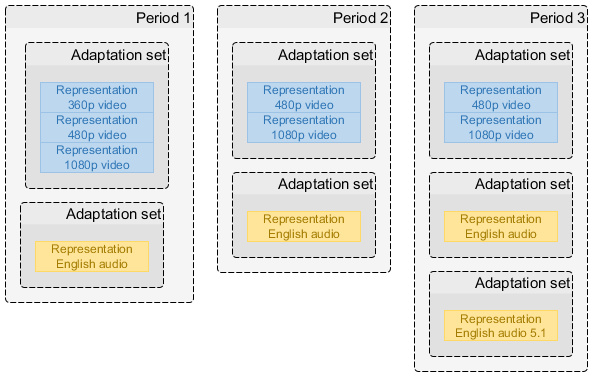
The MPD describes consecutive Periods which map data onto the MPD timeline.
-
Each Period describes one or more Representations, each of which provides media samples inside a sequence of Media Segments. Representations contain independent sample timelines that are mapped to the time span on the MPD timeline that belongs to the Period.
-
Representations within a Period are grouped into Adaptation Sets, which associate related Representations and decorate them with metadata.
7.3.3. Period Timing
7.3.3.1. General
An MPD defines an ordered list of one or more consecutive non-overlapping Periods [MPEGDASH]. A Period is both a time span on the MPD timeline and a definition of the data to be presented during this time span. Period timing is relative to the zero point of the MPD timeline, though often indirectly (being relative to the previous Period).

The start of a Period is specified either explicitly as an offset from the MPD
timeline zero point (Period@start) or implicitly by the end of the previous
Period [MPEGDASH]. The duration of a Period is specified either explicitly with
Period@duration or implicitly by the start point of the next Period
[MPEGDASH].
Periods are self-contained: a service shall not require a client to know the contents of another Period in order to correctly present a Period. Knowledge of the contents of different Periods may be used by a client to achieve seamless Period transitions, especially when working with period-connected Representations (see Part 5 for multi-Period content requirements).
Common reasons for defining multiple Periods are:
-
Assembling a presentation from multiple self-contained pieces of content.
-
Inserting ads in the middle of existing content and/or replacing spans of existing content with ads (see Part 5).
-
Adding/removing certain Representations as the nature of the content changes (e.g., a new title starts with a different set of offered languages).
-
Updating period-scoped metadata (e.g., codec configuration or DRM signaling).
A Period shall not have a duration of zero. MPD generators are expected to remove any Periods that are, for any reason, assigned a duration of zero. Clients shall ignore Periods with a duration of zero.
7.3.3.2. First and Last Period Timing
For static presentations (MPD@type="static"), the first Period shall start at the
zero point of the MPD timeline (with a Period@start value of 0 seconds), and the
last Period shall have a Period@duration. See Part 3 for additional on-demand
service constraints.
For dynamic presentations (MPD@type="dynamic"), the first Period shall start at or
after the zero point of the MPD timeline (with a Period@start value of 0 seconds
or greater). The last Period may have a Period@duration, in which case it has a
fixed duration. If without Period@duration, the last Period in a dynamic
presentation has an unlimited duration that may later be shortened by an MPD
update. See Part 4 for additional live and low-latency service constraints.
MPD@mediaPresentationDuration may be present in an MPD. If present, it shall
accurately match the duration between the zero point on the MPD timeline and the
end of the last Period. Clients shall calculate the total duration of a static
presentation by adding up the durations of each Period and shall not rely on the
presence of MPD@mediaPresentationDuration.
Carry over additional v4.3 timing-model formulae where they add interoperability value beyond ISO/IEC 23009-1. Avoid duplicating formulae that are now fully specified in the current MPEG-DASH edition.
7.3.4. Representation Timing
7.3.4.1. General
Representations provide the content for periods. A representation is a sequence of media segments, an initialization segment, an optional index segment and related metadata (see ISO/IEC 23009-1 [MPEGDASH] clauses 5.3.1 and 5.3.5).
The MPD describes each representation using a Representation element. For each representation, the MPD defines a set of segment references to the media segments and metadata describing the media samples provided by the representation.
7.3.4.2. Sample Timeline
The samples within a representation exist on a linear sample timeline defined by the encoder that creates the samples. Sample timelines are mapped onto the MPD timeline by metadata stored in or referenced by the MPD (see ISO/IEC 23009-1 [MPEGDASH] clause 7.3.2).
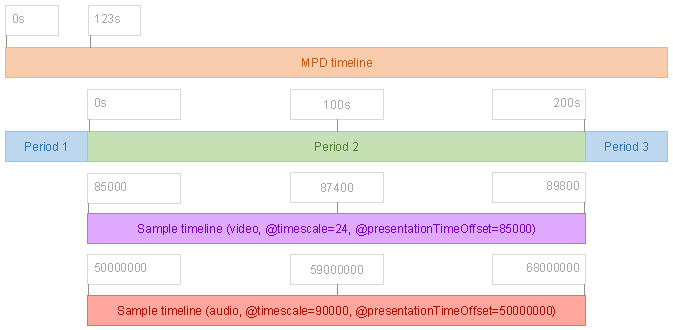
The sample timeline does not determine what samples are presented. It merely connects the timing of the representation to the MPD timeline and allows the correct media segments to be identified when a DASH client makes scheduling decisions driven by the MPD timeline.
The same sample timeline shall be shared by all representations in the same adaptation set [MPEGCMAF]. Representations in different adaptation sets may use different sample timelines.
A sample timeline is measured in timescale units defined as a number of units per second. This value (the timescale) shall be present in the MPD as SegmentTemplate@timescale or SegmentBase@timescale (depending on the addressing mode).
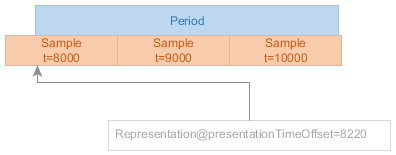
@presentationTimeOffset is the key component in establishing the relationship between the MPD timeline and a sample timeline.The zero point of a sample timeline may be at the start of the period or at any earlier point. The point on the sample timeline indicated by @presentationTimeOffset is equivalent to the period start point on the MPD timeline (see ISO/IEC 23009-1 [MPEGDASH] clause 5.3.9.2).
Note: To transform a sample timeline position SampleTime to an MPD timeline position, use the formula MpdTime = Period@start + (SampleTime - @presentationTimeOffset) / @timescale.
See the DASH-IF Guidelines-TimingModel document [DASHIF-TIMING] for detailed discussion of sample timeline mechanics.
7.3.5. Referencing Media Segments
7.3.5.1. General
Each segment reference addresses a media segment that corresponds to a specific time span on the sample timeline. The exact mechanism used to define segment references depends on the addressing mode used by the representation.
7.3.5.2. Necessary Segment References in Static Presentations
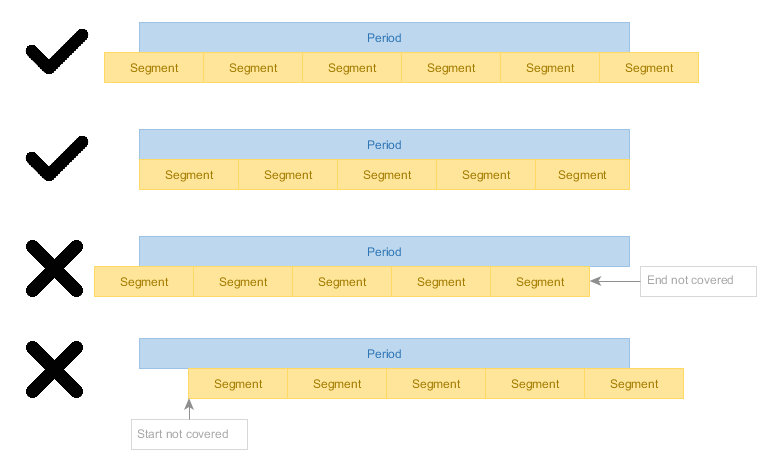
In a static presentation, a representation shall provide enough media segments to cover the entire time span of the period.
7.3.5.3. Necessary Segment References in Dynamic Presentations
In a dynamic presentation, a representation shall provide enough media segments to cover the time span of the period that intersects with the time shift buffer at any point during the MPD validity duration.
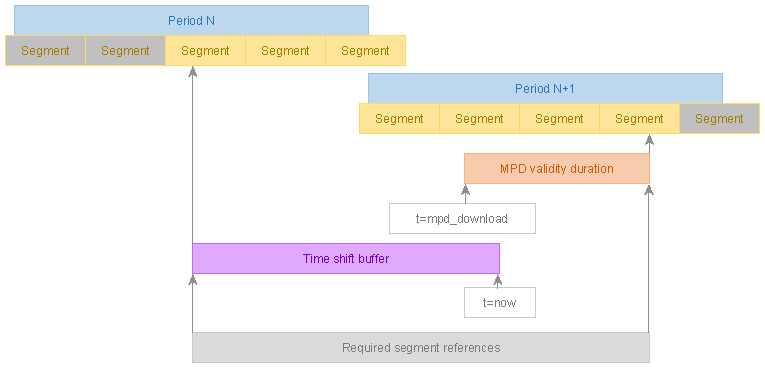
Note: It is a valid and common situation that a media segment is required to be referenced but is not yet available. See ISO/IEC 23009-1 [MPEGDASH] for segment availability timing rules.
See the DASH-IF Guidelines-TimingModel document [DASHIF-TIMING] for detailed discussion of segment reference requirements.
7.3.6. Clock Drift
7.3.6.1. General
Some encoders experience clock drift - they do not produce exactly 1 second worth of output per 1 second of input, either stretching or compressing the sample timeline with respect to the MPD timeline.
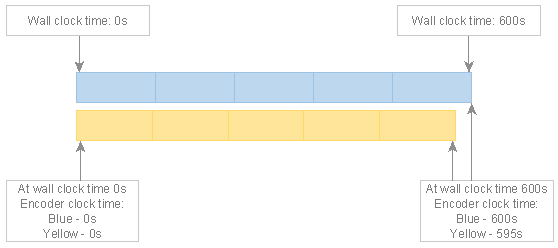
Clock drift not only causes timing model violations when an insufficient amount of data is produced but also leads to de-synchronization of content in tracks encoded based on different clocks. CMAF [MPEGCMAF] clauses 6.3 and 6.6.8 require tracks to be synchronized.
A DASH service shall not publish content that suffers from clock drift.
The solution is to adjust the encoder so that it correctly tracks wall clock time, e.g. by performing regular small adjustments to the encoder clock to counteract any "natural" drift it may be experiencing.
7.3.6.2. Workarounds for Clock Drift
If the encoder cannot be adjusted to not suffer from clock drift, DASH packagers should implement workarounds to ensure the presentation conforms to targeted standards. The following are examples of approaches a DASH packager could use:
-
Drop a span of content if input is produced faster than real-time.
-
Insert regular padding content if input is produced slower than real-time (silence, blank picture, repeating frames, or short-duration periods where affected representations are not present).
Such workarounds can be disruptive and only serve as a backstop to prevent complete playback failure caused by timing model violations.
See the DASH-IF Guidelines-TimingModel document [DASHIF-TIMING] for detailed discussion of clock drift issues and solutions.
7.3.7. Clock Synchronization
During playback of dynamic presentations, a wall clock is used as the timing reference for DASH client decisions. This is a synchronized clock shared by the DASH client and service.
It is critical to synchronize the clocks of the DASH client and service when using a dynamic presentation because the MPD timeline of a dynamic presentation is mapped to wall clock time and many playback decisions are clock driven.
Clock synchronization mechanisms are described by UTCTiming elements in the MPD (see ISO/IEC 23009-1 [MPEGDASH] clause 5.8.4.11).
The MPD of a dynamic presentation shall include at least one UTCTiming element that defines a clock synchronization mechanism.
A client presenting a dynamic presentation shall synchronize its local clock according to the UTCTiming elements in the MPD and shall emit a warning or error to application developers when clock synchronization fails.
A DASH client shall not use a synchronization method that is not listed in the MPD unless explicitly instructed to do so by the application developer.
See Part 4 for detailed requirements on clock synchronization in live services. See the DASH-IF Guidelines-TimingModel document [DASHIF-TIMING] for comprehensive discussion of clock synchronization.
7.4. DASH Representation Structures and Signalling
7.4.1. General
Representations in an Adaptation Set are alternatives for the same media component unless otherwise signalled. Adaptation Sets and Representations shall carry sufficient codec, profile, resolution, language, role, accessibility, content-protection, and essential/supplemental property signalling for a client to select and play the content.
Adaptation Set constraints from v4.3 remain applicable unless superseded by the media-specific parts: Representations in an Adaptation Set should be switchable at defined switching points and should use compatible decoder configurations where switching is expected.
7.4.2. Segment Information
7.4.2.1. General
DASH-IF IOP v5 uses the Segment information mechanisms of ISO/IEC 23009-1. This part defines three addressing modes for referencing Media Segments, Initialization Segments, and Index Segments in interoperable DASH presentations:
-
Indexed addressing (SegmentBase) - Uses an index segment to reference all Media Segments via byte ranges in a CMAF track file
-
Explicit addressing (SegmentTemplate with SegmentTimeline) - Uses a segment timeline to explicitly signal each Media Segment’s timing
-
Simple addressing (SegmentTemplate with duration) - Uses a nominal duration to derive Media Segment timing
All Representations in the same Adaptation Set shall use the same addressing mode. Representations in different Adaptation Sets may use different addressing modes.
Addressing mode selection should be based on the nature of the content:
-
Content generated on the fly (e.g., live encoding): Use explicit addressing
-
Content generated in advance of publishing (e.g., VOD): Use indexed addressing or explicit addressing
-
Simple packager implementations: May use simple addressing, though this comes at a cost of reduced applicability to multi-period scenarios and reduced client compatibility
| Mode | Addressing | Timeline information | Typical use |
|---|---|---|---|
| Number + Duration | $Number$
| @duration
| Regular Segment duration. |
| Number + SegmentTimeline | $Number$
| SegmentTimeline | Variable durations or gaps with sequence-number addressing. |
| Time + SegmentTimeline | $Time$
| SegmentTimeline | Media-time addressing; accurate timeline signalling. |
A SegmentTemplate-based Representation shall include all attributes and elements required by ISO/IEC 23009-1 for the selected mode. Attributes and elements not specified by this part are governed by ISO/IEC 23009-1.
Note: DVB-DASH [DVBDASH] restricts the addressing modes permitted for its Live and On-Demand profiles: DVB-DASH Live-profile presentations use explicit or simple SegmentTemplate addressing (Period.SegmentList and multiplexed Representations are excluded), while DVB-DASH On-Demand-profile presentations use Indexed addressing (SegmentBase) exclusively, with a single Segment per Representation. Content intended to remain compatible with DVB-DASH players should avoid mixing addressing modes within a Period in ways that are incompatible with these constraints.
7.4.2.2. Indexed Addressing (SegmentBase)
A Representation that uses indexed addressing consists of a CMAF track file containing an index segment, an Initialization Segment, and a sequence of Media Segments.
Note: This addressing mode is sometimes called "SegmentBase" in other documents.
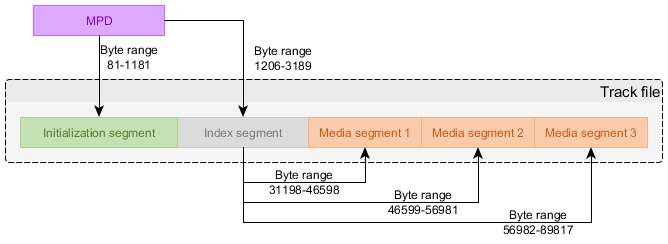
The MPD defines the byte range in the CMAF track file that contains the index segment. The index segment informs the client of all the Media Segments that exist, the time spans they cover on the sample timeline, and their byte ranges.
Multiple Representations shall not be stored in the same CMAF track file (i.e., no multiplexed Representations are to be used).
At least one Representation/BaseURL element shall be present in the MPD,
containing a URL pointing to the CMAF track file.
The SegmentBase@indexRange attribute shall be present in the MPD. The value of
this attribute identifies the byte range of the index segment in the CMAF track
file [MPEGDASH]. The value is a byte-range-spec as defined in [RFC7233],
referencing a single range of bytes.
The SegmentBase@timescale attribute shall be present and its value shall match
the value of the timescale field in the index segment (in the [ISOBMFF]
sidx box) and the value of the timescale field in the Initialization Segment
(in the tkhd box [ISOBMFF]).
The SegmentBase/Initialization@range attribute shall identify the byte range of
the Initialization Segment in the CMAF track file. The value is a
byte-range-spec as defined in [RFC7233], referencing a single range of
bytes. The Initialization@sourceURL attribute shall not be used.
Indexed addressing enables all data associated with a single Representation to be stored in a single CMAF track file from which byte ranges are served to clients to supply Media Segments, the Initialization Segment, and the index segment. This gives it unique advantages:
-
A single large file is more efficient to transfer and cache than many small files, reducing computational and I/O overhead
-
CDNs are aware of the nature of byte-range requests and can preemptively read-ahead to fill the cache ahead of playback
7.4.2.3. Explicit Addressing (SegmentTemplate with SegmentTimeline)
A Representation that uses explicit addressing consists of a set of Media Segments accessed via URLs constructed using a template defined in the MPD, with the MPD explicitly signaling the start time and duration of each Media Segment.
Note: This addressing mode is sometimes called "SegmentTemplate with SegmentTimeline" in other documents.
The SegmentTemplate@media attribute shall contain the URL template for
referencing Media Segments. The SegmentTemplate@initialization attribute shall
contain the URL template for referencing Initialization Segments.
Either the $Time$ or $Number$ template variable shall be present in
SegmentTemplate@media to uniquely identify Media Segments:
-
If using
$Number$addressing, the number of the first segment reference is defined bySegmentTemplate@startNumber(default value 1) [MPEGDASH] -
If using
$Time$addressing, the template value for each segment reference is the segment start point on the sample timeline [MPEGDASH]
The SegmentTimeline element shall be present and shall contain one or more S
elements that define the sequence of Media Segments. Each S element defines:
-
@t- Start time of the first Media Segment in this sequence (in timescale units). If omitted, the start time is derived from the previousSelement -
@d- Duration of each Media Segment in this sequence (in timescale units) -
@r- Number of times to repeat this Media Segment duration (optional, default 0)
Explicit addressing is particularly suitable for:
-
Content generated on the fly (e.g., live encoding)
-
Variable Media Segment durations
-
Signaling gaps in the timeline
-
Accurate timeline signaling for multi-period content
7.4.2.4. Simple Addressing (SegmentTemplate with duration)
A Representation that uses simple addressing consists of a set of Media Segments accessed via URLs constructed using a template defined in the MPD, with the MPD describing the nominal time span of the sample timeline covered by each Media Segment.
Note: This addressing mode is sometimes called "SegmentTemplate without SegmentTimeline" in other documents.
Simple addressing defines the nominal time span of each Media Segment in the MPD. The true time span covered by samples within the Media Segment can be slightly different than the nominal time span (up to ±50% of the nominal duration).
The SegmentTemplate@duration attribute defines the nominal duration of a Media
Segment in timescale units [MPEGDASH].
The SegmentTemplate@media attribute shall contain the URL template for
referencing Media Segments. The SegmentTemplate@initialization attribute shall
contain the URL template for referencing Initialization Segments.
Either the $Time$ or $Number$ template variable shall be present in
SegmentTemplate@media to uniquely identify Media Segments:
-
If using
$Number$addressing, the number of the first segment reference is defined bySegmentTemplate@startNumber(default value 1) [MPEGDASH] -
If using
$Time$addressing, the template value for each segment reference is the segment start point on the sample timeline minus@eptDelta[MPEGDASH]
The @eptDelta attribute may be used to adjust the Period start point relative
to the first Media Segment. The @eptDelta attribute shall be present if its
value is not zero.
Note: @eptDelta is expressed as an offset from the Period start point to the
segment start point of the first Media Segment [MPEGDASH]. The value will be
negative if the first Media Segment starts before the Period start point.
Simple addressing enables packager logic to be very simple. This simplicity comes at a cost of reduced applicability to multi-period scenarios and reduced client compatibility.
7.4.3. Segment List Computation
A DASH client derives the Segment list for a Representation from the MPD. For
@duration-based addressing, the segment sequence is derived from Period timing,
@duration, @timescale, @startNumber, and @presentationTimeOffset. For
SegmentTimeline-based addressing, the sequence is derived from the ordered S
elements and their @t, @d, and @r values.
For $Time$ addressing, the value substituted into the URL is the media time of
the Segment as signalled by the SegmentTimeline. For $Number$ addressing, the
value substituted into the URL is the segment number starting at @startNumber.
Reconstruct the full Part 2 draft Table 5 (mandatory/optional/default SegmentTemplate parameters for the three modes) and the detailed segment-list computation examples. [GROUNDED_BY=dashif-iop-v5-part2-draft#45..#51]
7.4.4. Subsegment Information
Subsegment information may be used by clients for byte-range access, random access, trick modes, low-latency operation, and other optimizations. Where CMAF Chunks are used, the low-latency constraints of Part 4 apply. Subsegment information shall be consistent with the media data and Segment addressing.
7.4.5. Segment and Representation to Media Presentation Time Mapping
For each Segment, the media presentation time is derived from media timestamps,
@timescale, @presentationTimeOffset, and the Period start. The authoring shall
ensure that the mapping is unambiguous and continuous unless a gap or discontinuity
is intentionally signalled.
8. CMAF to DASH Mappings
8.1. Introduction
The CMAF-to-DASH mapping shall preserve CMAF constraints while exposing DASH client operations through the MPD. In particular:
-
a CMAF Header maps to an Initialization Segment;
-
a CMAF Segment maps to a DASH Media Segment;
-
a CMAF Track maps to a DASH Representation;
-
CMAF Switching Sets map to switchable DASH Representation sets; and
-
CMAF Selection Sets map to alternative media-component selections.
The MPD shall not signal switching or selection capabilities that are not supported by the underlying CMAF media.
8.2. Period Connectivity
8.2.1. General
Period connectivity determines whether playback can continue seamlessly across a Period boundary or whether a discontinuity occurs. A presentation is period-connected when adjacent Periods allow continuous playback without decoder reinitialization. A presentation is period-disconnected when Period boundaries require decoder reset or introduce playback discontinuities.
According to [MPEGDASH] clause 5.3.2.1, Periods are period-connected when:
-
Adjacent Periods have no gap in their presentation times on the MPD timeline;
-
Representations in adjacent Periods belong to the same Adaptation Set or to Adaptation Sets with matching
@idvalues; and -
The media characteristics (codec, resolution, sample rate, etc.) allow seamless continuation without decoder reinitialization.
For period-connected presentations:
-
CMAF Switching Sets should maintain continuity across Period boundaries;
-
Segment timing shall ensure that the last sample of a Period and the first sample of the next Period form a continuous timeline;
-
Decoder state may be preserved across the Period boundary; and
-
Clients may perform seamless switching at the Period boundary.
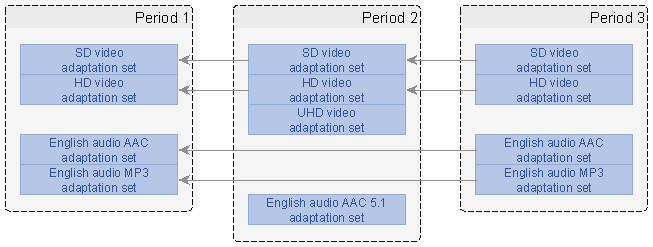
For period-disconnected presentations, the Period boundary introduces a discontinuity that may require decoder reset, buffer flushing, or other client operations. Content authors should signal period-disconnected boundaries clearly through MPD structure and should ensure that clients can detect and handle such boundaries appropriately.
8.2.2. Segment Overlap on Period Connectivity
When Periods are period-connected, Media Segments may span the Period boundary. In such cases:
-
The Segment shall be referenced by both Periods using appropriate
@presentationTimeOffsetvalues; -
The media timeline shall remain continuous across the boundary; and
-
Clients shall process the overlapping Segment according to the Period timing constraints.
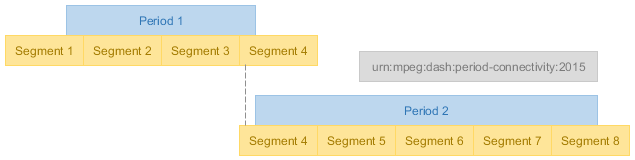
Segment overlap at Period boundaries is common in live services with dynamic Period insertion (e.g., ad insertion) and in multi-Period static content. Content authors shall ensure that overlapping Segments are correctly referenced and that timing remains unambiguous.
8.2.3. Period Continuity
In addition to period connectivity, [MPEGDASH] clause 5.3.2.4 defines period continuity. Continuity is a special case of period connectivity that indicates no timeline discontinuity is present at the transition point between the media samples of the two continuous Periods. Under continuity conditions, the client is expected to be able to continue seamless playback by merely appending Media Segments from the new Period, without any reconfiguration at the Period boundary.
Continuity shall not be signalled if the first/last sample in the Media Segment on the Period boundary does not exactly start/end on the Period boundary. This cannot be expected to be generally true, as Period boundaries are often an editorial decision independent of the Media Segment and sample layout.
Period continuity may be signalled in the MPD when the above condition is met, in which case period connectivity shall not be simultaneously signalled on the same Representation. Continuity implies connectivity [MPEGDASH].
The signalling of period continuity is the same as for period connectivity, except
that the value to use for @schemeIdUri is urn:mpeg:dash:period-continuity:2015
[MPEGDASH] clause 5.3.2.4.
Clients may take advantage of any platform-specific optimizations for seamless playback that knowledge of period continuity enables; beyond that, clients shall treat continuity the same as connectivity.
8.3. Samples on Period Boundaries
Sample alignment at Period boundaries affects seamless playback and switching behavior. For period-connected presentations, samples at the Period boundary shall maintain presentation time continuity and shall allow decoder state preservation.
Key considerations for samples at Period boundaries:
-
Presentation Time Continuity: The presentation time of the first sample in Period N+1 shall immediately follow the presentation time of the last sample in Period N, accounting for sample duration.
-
Decode Time Handling: Decode timestamps shall maintain proper ordering across the boundary, particularly for media with B-frames or other reordering.
-
Random Access Points: If a Period boundary requires a random access point (e.g., for period-disconnected presentations), the first sample in the new Period shall be a random access point (IDR frame for video, sync sample for audio).
-
Sample Dependencies: For period-connected presentations, samples in Period N+1 may depend on samples in Period N if the decoder state is preserved.
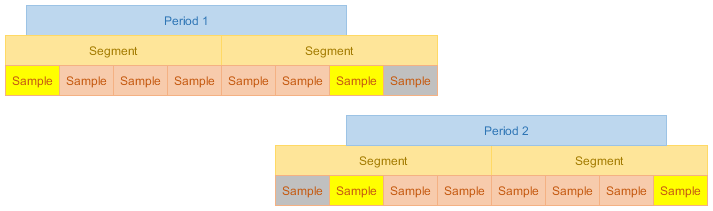
Content authors shall ensure that:
-
Sample timing is unambiguous at Period boundaries;
-
Decoder requirements are clearly signalled through MPD and media metadata;
-
Period boundaries align with appropriate media structure (e.g., GOP boundaries for period-disconnected presentations); and
-
Switching Sets maintain consistent sample alignment across Periods.
For period-disconnected presentations, the first sample of each Period shall be a random access point, and clients shall reinitialize decoders as needed.
8.4. Non-Equal Length Tracks
8.4.1. General
When creating multi-Period presentations, content authors often encounter situations where different media components (video, audio, subtitles) have different durations. This creates a challenge: how should the Period structure accommodate tracks of varying lengths while maintaining proper synchronization and playback continuity?
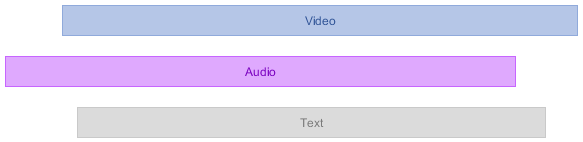
Several strategies exist for handling non-equal length tracks, each with different trade-offs:
8.4.2. Padding Strategy
The padding strategy extends shorter tracks to match the duration of the longest track by adding padding content (silence for audio, blank frames for video, empty subtitles for text).
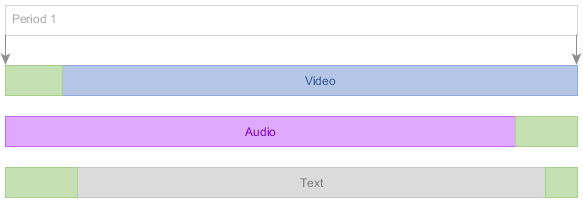
Advantages:
-
Simple Period structure (single Period for entire presentation)
-
All tracks remain synchronized throughout
-
No Period boundaries to manage
Disadvantages:
-
Increases bandwidth consumption for padded content
-
May require generating artificial padding content
-
Padding content must be properly signalled to avoid playback artifacts
When using padding:
-
Padding content shall be valid media that decoders can process without errors
-
Audio padding should be silence at appropriate sample rate
-
Video padding should use minimal bitrate (e.g., static frame)
-
Subtitle padding may use empty cues or no active subtitles
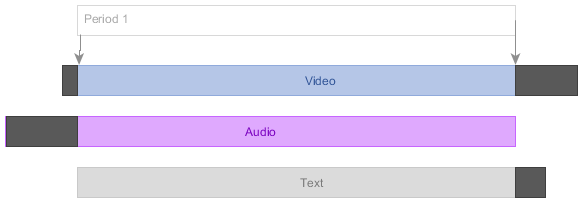
8.4.3. Cutting Strategy
The cutting strategy truncates longer tracks to match the duration of the shortest track, discarding content that extends beyond the common duration.
Advantages:
-
Simple Period structure (single Period)
-
No artificial content generation required
-
Minimal bandwidth usage
Disadvantages:
-
Loses content from longer tracks
-
May not be acceptable if all content must be preserved
-
Requires careful selection of cut point (should align with random access points)
When using cutting:
-
Cut points shall align with random access points for affected tracks
-
The final sample of each track shall have proper duration signalling
-
Content authors should ensure the cut point represents a natural end for all tracks
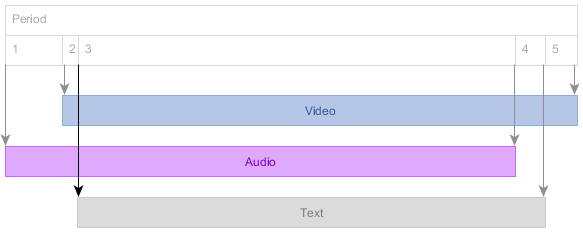
8.4.4. Period Splitting Strategy
The Period splitting strategy creates multiple Periods, with each Period containing only the tracks that have content for that time span. This preserves all original content without adding padding.
Advantages:
-
Preserves all original content
-
No artificial padding required
-
Efficient bandwidth usage
-
Natural representation of content structure
Disadvantages:
-
More complex Period structure
-
Requires careful Period boundary management
-
May require Period-connected or period-disconnected signalling
-
Client must handle Period transitions
When using Period splitting:
-
Period boundaries shall align with random access points
-
Adaptation Set continuity shall be properly signalled across Periods
-
Period timing shall ensure no gaps or overlaps on the MPD timeline
-
Content authors should consider whether Periods are period-connected or period-disconnected
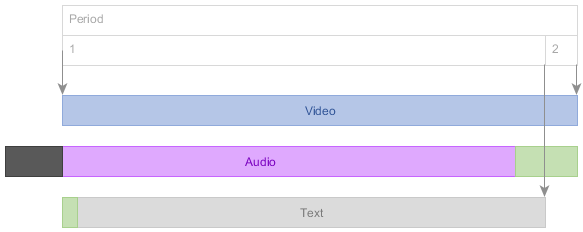
8.4.5. Mixed Strategy
The mixed strategy combines elements of padding, cutting, and Period splitting to optimize for specific use cases. For example, minor duration differences might be handled with padding while major differences trigger Period splitting.
Advantages:
-
Flexible approach tailored to specific content
-
Can optimize for bandwidth, complexity, or content preservation
-
Allows different strategies for different track types
Disadvantages:
-
Most complex to implement
-
Requires careful decision logic
-
May be harder to validate and test
When using mixed strategies:
-
Decision criteria shall be clearly defined and consistently applied
-
Each strategy component shall follow the requirements for that strategy
-
The overall Period structure shall remain coherent and unambiguous
8.4.6. Strategy Selection Guidance
Content authors should select a strategy based on:
-
Content preservation requirements: If all content must be preserved, avoid cutting strategy
-
Bandwidth constraints: Padding increases bandwidth; Period splitting or cutting minimizes it
-
Client compatibility: Some clients may handle Period transitions better than others
-
Duration differences: Small differences favor padding; large differences favor Period splitting
-
Content type: Audio padding is simpler than video padding; subtitles may naturally end early
8.5. Period Splitting
8.5.1. General
Period splitting is the process of dividing a single Period into multiple consecutive Periods. This is commonly needed when:
-
Handling non-equal length tracks (as described above)
-
Inserting ads or other content into an existing presentation
-
Updating metadata or codec parameters mid-presentation
-
Accommodating content protection changes
-
Managing live service boundaries
8.5.2. When to Split Periods
Periods should be split when:
-
Different media components have significantly different durations
-
Content characteristics change (codec, resolution, DRM, etc.)
-
Ad insertion or content replacement is required
-
Metadata updates cannot be signalled within a single Period
-
Service operations require distinct content segments
Periods should not be split unnecessarily, as each Period boundary introduces complexity for both content authoring and client playback.
8.5.3. How to Split Periods
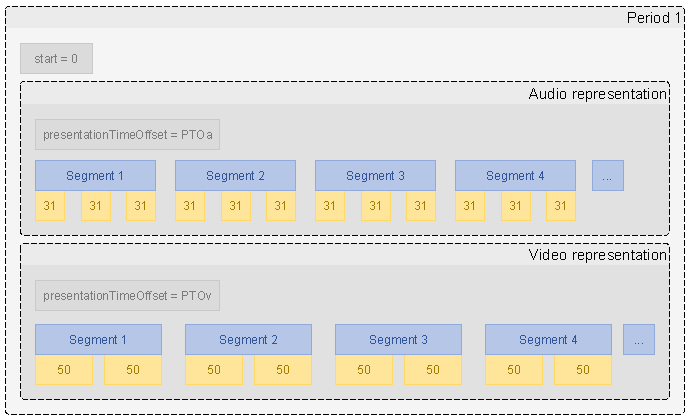
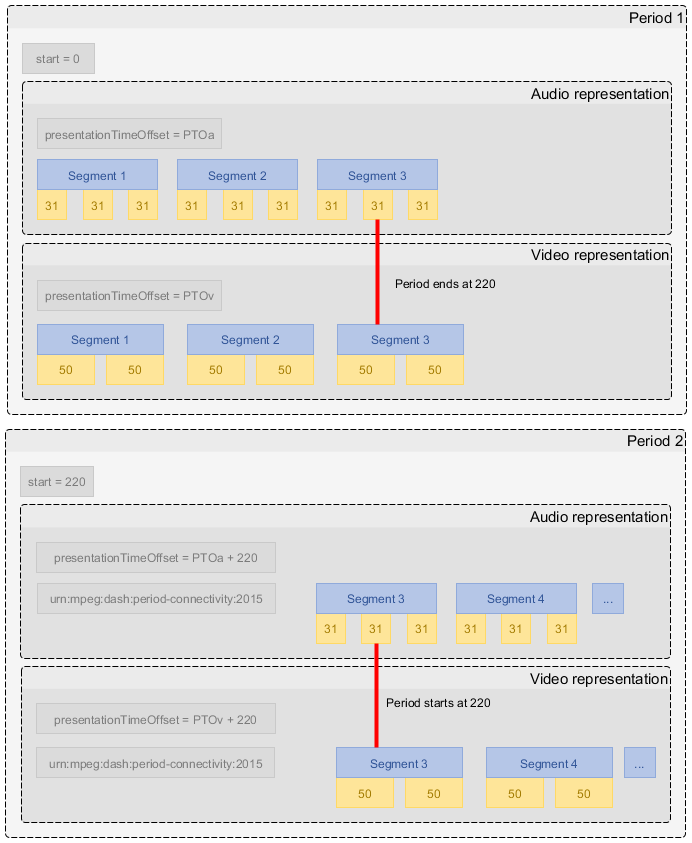
When splitting Periods, content authors shall:
-
Identify the split point: Choose a point on the MPD timeline where the split should occur. This shall align with random access points in all affected tracks.
-
Determine Period connectivity: Decide whether the Periods should be period-connected (seamless playback) or period-disconnected (discontinuity allowed).
-
Set Period timing: Assign
Period@startandPeriod@durationvalues such that:-
The first Period ends at the split point
-
The second Period starts at the split point
-
No gap or overlap exists on the MPD timeline
-
-
Distribute Representations: Assign Representations to the appropriate Period based on their content availability:
-
Representations that span the split point may appear in both Periods (if period-connected)
-
Representations that end before the split point appear only in the first Period
-
Representations that start after the split point appear only in the second Period
-
-
Maintain Adaptation Set consistency: If Adaptation Sets span multiple Periods, use matching
@idvalues to signal continuity. -
**Update
@presentationTimeOffset**: Ensure each Representation’s@presentationTimeOffsetcorrectly maps its sample timeline to the Period’s position on the MPD timeline. -
Verify Segment references: Ensure all Segment references remain valid and correctly address the media data.
8.5.4. Period Splitting and Decoder State
For period-connected Periods:
-
Decoder state may be preserved across the boundary
-
Samples in the second Period may depend on samples in the first Period
-
The split point should align with GOP boundaries but need not be an IDR frame
For period-disconnected Periods:
-
Decoder state shall be reset at the boundary
-
The first sample in the second Period shall be a random access point
-
No sample dependencies shall cross the Period boundary
8.5.5. Period Splitting Best Practices
Content authors should:
-
Minimize the number of Period splits to reduce complexity
-
Align split points with natural content boundaries (scene changes, chapter marks)
-
Use period-connected Periods when seamless playback is required
-
Use period-disconnected Periods when content characteristics change significantly
-
Test Period transitions with representative client implementations
-
Document the rationale for Period splits in content metadata
8.6. Good Multi-Period CMAF Content
Multi-Period content is common for ad insertion, program boundaries, blackout replacement, and service operations. For continuous CMAF multi-Period content, the Period boundary shall not require decoder reset or visible/audible disruption unless such discontinuity is intentionally signalled and expected by the service.
A service offering continuous multi-Period CMAF content should ensure:
-
Period boundaries align with random access points for the affected media;
-
decoder configurations are compatible across Periods where continuity is expected;
-
the same media component semantics are preserved across adjacent Periods; and
-
Period start times and Segment timing are consistent with the intended media presentation timeline.
The Part 2 draft contains substantial unfinished text on Good Multi-Period CMAF Content, including continuous CMAF multi-Period content, service-offering requirements, client-processing requirements, and profile signalling. This draft captures the core intent only; the detailed profile text must be completed with Part 5 ad-insertion alignment. [GROUNDED_BY=dashif-iop-v5-part2-draft#73..#93]
8.7. Multi-Period Content Profile Signalling
Where a DASH-IF profile or identifier is used to signal multi-Period CMAF constraints, the signalling shall be present at the MPD or Period level as specified by that profile. Clients that claim support for the profile shall support the associated multi-Period processing rules.
Confirm whether legacy v4.3 profile identifiers such as the DASH-IF Mixed On-Demand profile remain valid, are deprecated, or are replaced by IOP v5 identifiers. [GROUNDED_BY=dashif-iop-v4-3#90]
9. Common Service Functions
9.1. Bandwidth Signalling
Representation@bandwidth shall be authored according to ISO/IEC 23009-1 and
shall reflect the bandwidth needed for stable retrieval and playback of the
Representation. Content authors should ensure that bandwidth values are
sufficiently accurate for adaptation logic and are consistent across equivalent
Representations.
Reconcile the Part 2 draft bandwidth-signalling requirements and client
processing guidance with the current MPEG-DASH definition of @bandwidth and
with media-specific constraints. [GROUNDED_BY=dashif-iop-v5-part2-draft#94..#97]
9.2. Static Services
A static service uses MPD@type="static". All media announced in the MPD is
available for consumption without requiring MPD updates. Static services may use
any Segment or Subsegment information mode permitted by this part and the
applicable profile.
For static services:
-
MPD@typeshall bestatic; -
the Media Presentation duration shall be determinable from the MPD;
-
MPD@minimumUpdatePeriodshall not be present; and -
dynamic-service-only attributes such as
MPD@timeShiftBufferDepthandMPD@suggestedPresentationDelayshould not be present.
Client implementations shall ignore dynamic-only timing information if it is erroneously present in a static service unless a referenced profile specifies otherwise.
9.3. Dynamic Services
A dynamic service uses MPD@type="dynamic". Media availability evolves over
wall-clock time, and the client derives Segment availability from the MPD and the
time-synchronization rules in Part 4. Dynamic services may be MPD-controlled or
may use segment-based signalling for MPD validity and updates.
The generic timing and addressing principles in this part apply to dynamic services; live-service-specific requirements are defined in Part 4.
9.4. MPD Updates
An MPD update publishes a new MPD instance for the same Media Presentation. The
updated MPD shall maintain a consistent MPD timeline and shall update
MPD@publishTime whenever the MPD content changes. Clients use the MPD update
mechanisms of ISO/IEC 23009-1, including MPD@minimumUpdatePeriod, MPD validity
expiry events, and MPD.Location where applicable.
Note: DVB-DASH [DVBDASH] enumerates a fixed set of MPD update changes that
DVB-DASH players are required to support (adding Representations/Adaptation
Sets, updating SegmentTimeline S elements, switching MPD@type from
dynamic to static, adding/removing/updating BaseURL and Event/InbandEventStream
elements, and adding/removing Periods without invalidating already-available
Segment references) and a set of attributes that shall not change between
updates (@timeShiftBufferDepth, @availabilityStartTime,
Period@AssetIdentifier, Period@id/@start for a given dynamic Period, and
several per-Representation identifiers). Services targeting DVB-DASH
compatibility should restrict MPD updates to this enumerated set.
Complete the Part 2 draft MPD update rules and reconcile with Part 4 live service text to avoid duplication. [GROUNDED_BY=dashif-iop-v5-part2-draft#105..#108]
9.5. MPD and Segment Locations
The MPD.Location element may be used to redirect clients to another MPD update
location. BaseURL elements at MPD, Period, Adaptation Set, Representation, or
Segment levels may be used to resolve Segment URLs, support replication, and
offer content through multiple CDNs. Content authors shall ensure that reference
resolution is deterministic and follows ISO/IEC 23009-1.
A service may use multiple BaseURL elements for redundancy, load distribution, or CDN selection. Client behaviour for multiple Base URLs is governed by ISO/IEC 23009-1 and any applicable DASH-IF part.
9.6. Gap Handling
Gaps may occur when a Representation has missing media for a portion of the MPD timeline. Gaps shall be signalled using the mechanisms of ISO/IEC 23009-1 and the selected Segment information mode. A client shall not infer media availability in an interval that is not signalled by the MPD or media data.
The Part 2 draft has a placeholder for gap handling. Complete normative service-offering and client-processing rules, including alignment with SegmentTimeline gaps, Period boundaries, and low-latency resynchronization. [GROUNDED_BY=dashif-iop-v5-part2-draft#111..#115]
9.7. MPD Size and Structural Limits
Note: DVB-DASH [DVBDASH] imposes hard structural limits on the MPD that are not mandated by ISO/IEC 23009-1 itself: a maximum MPD size of 256 KB before and after xlink resolution, a maximum of 64 Periods, a maximum of 16 Adaptation Sets per Period, and a maximum of 16 Representations per Adaptation Set. DVB-DASH also requires a minimum Segment duration of 960 ms (except for the final Segment of a Period) and caps subtitle Segment size at 512 KB. Services that need to remain usable by DVB-DASH players should keep MPD structure within these limits even where this part and ISO/IEC 23009-1 do not themselves impose such a limit.
10. Content Annotation and Media Mapping
Content annotation and media-specific mapping are handled by the media parts and by descriptors defined in ISO/IEC 23009-1. This part defines only common principles: descriptors shall be used consistently, shall not contradict the media data, and shall provide enough information for a DASH client and the application to perform selection, switching, accessibility handling, and protection processing.
The Part 2 draft contains a future framework for content annotation and media mapping (including client processing reference model text). This needs to be reconciled with Parts 7, 8, 9, 10, and HTML5/MSE platform processing before it can become normative. [GROUNDED_BY=dashif-iop-v5-part2-draft#116..#129]
11. Segment Loss Handling
Due to network or other faults, it is possible that Media Segments do not reach the DASH packager, effectively creating a discontinuity in a Representation. As DASH clients typically have difficulties processing content with gaps and the timing model forbids gaps in general, missing segments would likely lead to an unsatisfactory playback experience for end-users.
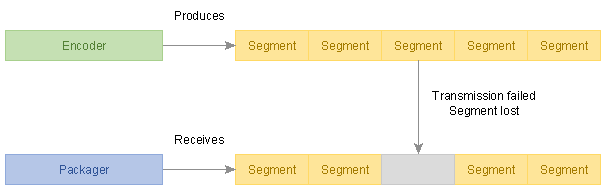
DASH services shall not publish Periods that have missing segments, whether the segment loss is described by "missing content segments" ([MPEGDASH] clause 6.2.6) or by any other means (including not describing it).
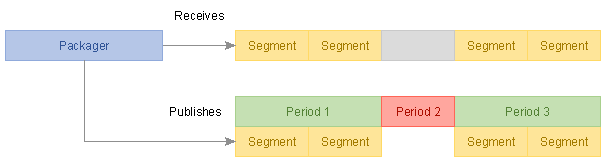
Instead, DASH services should start a new Period that does not include the Representation that would experience a gap, later restoring the Representation with a new Period transition. Period-connected Adaptation Sets can enable DASH clients to perform such transitions seamlessly in some scenarios.
Note: Some DASH clients experience difficulties when transitioning to/from a very short Period (e.g. with a duration of only 1 Media Segment). Implementations may extend the transition Period for better compatibility with such clients.
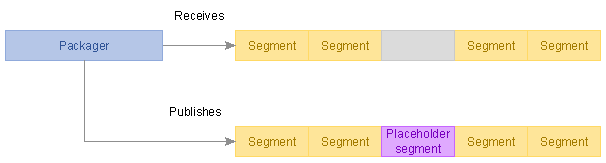
Alternatively, given a sufficiently capable DASH packager and provided that technical constraints of Representations are satisfied, the missing Media Segment may be replaced with an aligned Media Segment from a lower bitrate.
12. Stand-alone Text Track Timing
Some services store text Adaptation Sets in stand-alone IMSC1 or WebVTT files, without segmentation or [ISOBMFF] encapsulation.
Note: Storing text tracks in stand-alone files is not permitted by [MPEGCMAF]. If a DASH service is intended to conform to [MPEGCMAF], text tracks shall be stored as segmented CMAF tracks.
Timecodes in stand-alone text files shall be relative to the Period start point.
@presentationTimeOffset shall not be present in the Representation and shall
be ignored by clients if present.
13. Forbidden Techniques
Some aspects of [MPEGDASH] are not compatible with the interoperable timing model defined in this document. In the interest of clarity, they are explicitly listed here:
-
The
@presentationDurationattribute shall not be used. This information serves no purpose under the interoperable timing model. -
The
@availabilityTimeCompleteattribute shall not be used. The concept of "incomplete but available" Media Segments that this attribute enables is not part of the interoperable timing model. -
There shall not be "missing content segments" ([MPEGDASH] clause 6.2.6) in the content. If content is lost during processing, the expectation is that the encoder/packager will either replace it with valid content (e.g. content from a lower Representation or blank picture or silent audio) or start a new Period that does not contain the Representation that incurs data loss (see § 11 Segment Loss Handling).
14. Timing Constraints
14.1. Large Timescales and Time Values
[ECMASCRIPT] is unable to accurately represent numeric values greater than 253 (9007199254740991) using built-in types. Therefore, interoperable services cannot use such values.
All timescales and start times used in a DASH presentation shall be sufficiently small that no timecode value exceeding 253 will be encountered, even during the publishing of long-lasting live services.
Note: This may require the use of 64-bit fields, although the values must still be limited to under 253.
The issue does not arise with the common 90 KHz timescale. Counting time since the Unix epoch until 11 November 2019 we get 141721093260000 which is well within the allowed range of values.
Another common timescale is 10000000 (10 million timescale units per second) often used by Smooth Streaming. Counting time since the Unix epoch until 11 November 2019 we get 15746788140000000 which does exceed the critical value and will result in broken playback on many clients! To correct such an error, use a smaller timescale or an MPD timeline zero point that is not so far in the past.
14.2. Representing Durations in XML
All units expressed in MPD fields of datatype xs:duration shall be treated as fixed size:
-
60S = 1M (minute)
-
60M = 1H
-
24H = 1D
-
30D = 1M (month)
-
12M = 1Y
MPD fields having datatype xs:duration shall not use the year and month units and should be expressed as a count of seconds, without using any of the larger units.
15. Open Issues and Work Items
The following work items remain before Part 2 can be considered complete:
| Topic | Status | Source grounding | Next action |
|---|---|---|---|
| Overview clause | Drafted | dashif-iop-v5-part2-draft#10
| Replace the draft’s "To be done" with reviewed overview text. |
| CMAF structural model figure | Open | dashif-iop-v5-part2-draft#13..#17
| Redraw the CMAF content model as a clean diagram or table. |
| SegmentTemplate parameter table | Open | dashif-iop-v5-part2-draft#45..#51
| Recreate Table 5 (M/O/defaults for Number+Duration, Number+SegmentTimeline, Time+SegmentTimeline). |
| Segment-list computation formulae | Partial | dashif-iop-v5-part2-draft#46..#51; dashif-iop-v4-3#75..#80
| Carry over only formulae that add interoperability value beyond current MPEG-DASH. |
| Subsegment information | Partial | dashif-iop-v5-part2-draft#52..#56
| Complete relationship to CMAF chunks and Part 4 low-latency. |
| Good Multi-Period CMAF Content | Partial | dashif-iop-v5-part2-draft#73..#93; dashif-iop-v4-3#90
| Complete continuous-boundary requirements and profile signalling; align with Part 5. |
| Bandwidth signalling | Partial | dashif-iop-v5-part2-draft#94..#97
| Define exact @bandwidth interpretation and validator expectations.
|
| Static/dynamic split | Partial | dashif-iop-v5-part2-draft#98..#104; dashif-iop-v4-3#74..#80
| Deduplicate with Part 3 and Part 4. |
| MPD updates | Partial | dashif-iop-v5-part2-draft#105..#108
| Consolidate with live-service update rules in Part 4. |
| Locations/BaseURL | Partial | dashif-iop-v5-part2-draft#109..#110
| Add normative client and content-author guidance. |
| Gap handling | Open | dashif-iop-v5-part2-draft#111..#115
| Complete service-offering and client-processing rules. |
| Content annotation framework | Open | dashif-iop-v5-part2-draft#116..#129
| Reconcile with media parts and event/metadata parts. |
16. Change History
| Version | Date | Change |
|---|---|---|
| 0.1 | Initial | Consolidated initial Bikeshed draft from the Part 2 working draft and carried-over v4.3 timing/on-demand/multi-period basics; added explicit open issues. |